Appendix B. Sportsbook Start Game

Appendix B. Sportsbook Start Game

To open a BetBy Sportsbook, the casino sends a Sportsbook start game request and receives a JSON object with the values required to open the BetBy Sportsbook.

{
  "url": "a URL for a javascript code that renders the sports book",
  "brandId": "brand identifier on BetBy side as configured on Tech Fusion",
  "key": "provider session ID. Built by the sessionId received from the casino with casino_id prefix",
  "themeName": "Design pattern identifier"
}

The casino is responsible for embedding the sports component in the website. This is the process:

  1. A player opens a sportsbook section in the casino.
  2. The casino sends a request to the Tech Fusion API to open the game.
  3. The Tech Fusion API returns a JSON object as described above.
  4. The casino renders HTML based on the values in the response.
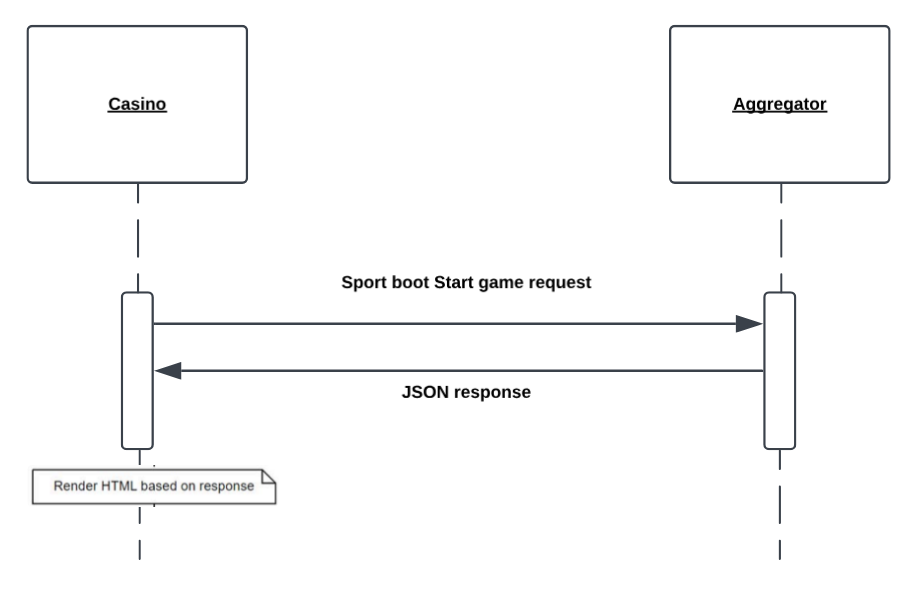
sportbook_startgame_chart sportbook_startgame_chart

Subsections of Appendix B. Sportsbook Start Game

Sportsbook Start Game Request

Sportsbook Start Game Request

Requests a Sportsbook game launch URL and starts a new game.

Request endpoint: https://{techfusion_domain}/game/sportsbook/

Request Method: GET

{
  "url": "a URL for a javascript code that renders the sports book",
  "brandId": "brand identifier on BetBy side as configured on Tech Fusion",
  "key": "provider session ID. Built by the sessionId received from the casino with casino_id prefix",
  "themeName": "Design pattern identifier"
}

Request parameters:

Parameter Data type Description
accountid String(60) -[0-9a-zA-Z] required Account ID Example: 5179068
country String required Examples:
• IL
• UK
• US
currency String required Currency
Example: EUR
device_type String required The device currently used by the player.
Note: Some games are not available on both desktop and mobile devices.
Valid values:
• desktop
• mobile
exitUrl String optional Exit URL
Example: http://myhomepage.com
gameid Integer required Game ID.
Example: 80102
historyUrl String required The URL for viewing the player’s gaming history in the casino.
This is used for regulation requirements.
homeurl String required The page URL that the player is redirected to after closing the game.
Example: http://www.somecasinostaging.com/
is_test_account Boolean required when using real mode Indicates that the player is a test player using a test account.
Test players are excluded from reports.
Valid values:
•false: The player is a regular player with a real account.
•true: The player is used for testing purposes and uses a test
lang String required Language
Example: en_US
license String required The country that has gaming jurisdiction over the player.
Examples:
• Curacao
• Malta
• UK
mode String required The game mode. Valid values:
• demo
• real
operatorid String required The Tech Fusion ID for the casino.
Example: 11
rc_url String optional Rc_url
Example: ``````
realityCheckElapsed Integer optional realityCheckElapsed
Example: 10
realityCheckInterval Integer optional realityCheckInterval
Example: 15
sessionid String(27) required Session ID
Example: ${ nogsoperatorid}_99d71938-c2d9-4844-b950-d598c2es

Example Response:

Success response:

{
  "url": "https://url_from_response.com",
  "brandId": "11",
  "key": "11_4f5g-aa89-b81c-294a",
  "themeName": "Theme name",
  "token": "11_11_4f5g-aa89-b81c-294a"
}

Error response:

{
  "errMsg": "general_error"
}

HTML processing

HTML processing

The HTML code that the casino displays to the player has to include the javascript code by referring to the URL received in the response as the URL parameter. The script contains definitions of functions and classes needed to render the Sportsbook on the casino side. Here is an example:

<script src="https://url_from_response.com"></script>

Once the DOM is loaded, the casino has to initialize the BTRenderer object:

var bt = new BTRenderer().initialize({
    brand_id: 'brandId from response',
    key: 'key from response',
    themeName: 'themeName from response',
    lang: lang,
    target: document.getElementById('betby'),
    minFrameHeight: 700,
    betSlipOffsetTop: 0,
    betslipZIndex: 999,
    cssUrls: [
        'https://fonts.googleapis.com/css2?family=Montserrat:ital,wght@0,100;0,200;0,300;0,400;0,500;0,600;0,700;0,800;0,900;1,100;1,200;1,300;1,400;1,500;1,600;1,700;1,800;1,900&display=swap',
        'https://link.to.google.fonts.css',
        'https://link.to.some.other.fonts.css',
        'https://link.to.some.extra.css.for.future.css'
    ],
    fontFamilies: [
        'Montserrat, sans-serif',
        'Roboto, sans-serif'
    ],
    onRouteChange: function () {
        // Handle route changes
    },
    onLogin: function () {
        // Handle user login
    },
    onRegister: function () {
        // Handle user registration
    },
    onRecharge: function () {
        // Handle user recharge
    },
    onSessionRefresh: function () {
        // Handle session refresh
    }
});

The values of the brandId, key, and themeName parameters are taken from the Start game response that was received from Tech Fusion.

The target parameter is an HTML element into which BetBy embeds the Sportsbook UI.

The casino customizes the look and behavior of the Sportsbook through the parameters passed to the BTRenderer.

Description of parameters:

Parameter Data Type Description
betSlipOffsetBottom Number The gap between the window bottom and the betslip. For example, this may be a fixed footer.
betSlipOffsetTop Number The gap between the window top and the opened betslip. For example, this may be a fixed header.
betslipZIndex Number The index of the betslip in relation to the DOM elements used on the Partner’s website. This helps to prevent overlapping conflicts.
cssUrls String array The links to fonts used on the Partner’s website.
Note: This parameter is used for fonts only!
fontFamilies String array Lists the font names that are used on the Partner’s website.
lang String Frame language. The full list of supported languages can be reviewed in the Appendices section. The abbreviation is case-sensitive.
Default: en
onLogin callback The callback function provided by the Partner that is called when a player logs in with the frame.
onRecharge callback The callback function provided by the Partner that is called when a player makes a deposit with the frame.
onRegister callback The callback function provided by the Partner that is called when a player registers with the frame.
onRouteChange callback The callback function provided by the Partner that is called when a player navigates across the frame.
onSessionRefresh callback The callback function provided by the Partner that is responsible for generating a new key and passing it to the frame. This function is called when a session token has expired.
target HTML element The HTML element where the bet slip is rendered.