Introduction
Tech Fusion API Documentation
Info
**Welcome to the Tech Fusion API Documentation.** This guide provides comprehensive information for integrating with the Tech Fusion Technology Aggregation platform.
Overview
Tech Fusion Technology Aggregation is a one-stop solution for all casino content needs. The platform connects casino operators to an ever-expanding collection of games, from the latest releases to all-time classics.
Through the Tech Fusion API, casino operators can access content from more than 100 game providers with minimal integration effort. One single integration opens a new world of gaming content for your players!

Core Features
- Game Aggregation - Access to games from over 100 providers through a single integration
- Unified Wallet - Seamless transaction handling across all games
- Free Round Bonuses - Create and manage bonus offers across the platform
- Detailed Reporting - Access comprehensive game history and transaction data
- Sportsbook Integration - Dedicated support for sportsbook products
System Architecture
The Tech Fusion API uses a RESTful architecture with standard HTTP requests and JSON responses. All API endpoints are secured with authentication to ensure the safety of player data and transactions.
graph TD
A[Casino Operator] <-->|API Integration| B[Tech Fusion Platform]
B <--> C1[Game Provider 1]
B <--> C2[Game Provider 2]
B <--> C3[Game Provider 3]
B <--> C4[Game Provider n]
style A fill:#f5f5f5,stroke:#333,stroke-width:2px
style B fill:#e6f7ff,stroke:#333,stroke-width:2px
style C1 fill:#f0f0f0,stroke:#333,stroke-width:1px
style C2 fill:#f0f0f0,stroke:#333,stroke-width:1px
style C3 fill:#f0f0f0,stroke:#333,stroke-width:1px
style C4 fill:#f0f0f0,stroke:#333,stroke-width:1px
General Flow Diagram
The diagram below illustrates the core workflow when a player interacts with a game through the Tech Fusion platform:
sequenceDiagram
participant Player
participant Casino as Casino Operator
participant Tech Fusion as Tech Fusion Platform
participant Game as Game Provider
Player->>Casino: Login & Browse Games
Casino->>Tech Fusion: Request Game Launch
Tech Fusion->>Casino: Generate Game URL
Casino->>Player: Present Game Interface
rect rgb(240, 240, 240)
Note over Player,Game: Gameplay Transactions
Player->>Game: Initiate Game Action
Game->>Tech Fusion: Send Transaction Request
Tech Fusion->>Casino: Forward Transaction (Wager/Result)
Casino->>Tech Fusion: Process Transaction & Return Balance
Tech Fusion->>Game: Update Player Balance
Game->>Player: Display Game Outcome
end
Player->>Game: Exit Game
Game->>Tech Fusion: End Session
Tech Fusion->>Casino: Update Session Status
Integration Process
Integrating with the Tech Fusion API involves the following steps:
-
Setup Phase
- Receive API credentials from Tech Fusion
- Configure endpoints and security settings
- Set up webhook URLs for notifications
-
Basic Integration
- Implement player authentication
- Setup balance management endpoints
- Integrate game launch functionality
-
Transaction Processing
- Implement wager and result handling
- Setup rollback processing
- Configure jackpot management
-
Advanced Features
- Free Round Bonus integration
- Game history and reporting
- Marketing tools integration
Documentation Structure
This documentation is organized into the following main sections:
- Introduction - Overview and key concepts
- Start Game - Game initialization process
- Transaction API - Handling wagers, results, and balance management
- Free Round Bonuses - Setting up and managing bonuses
- Games from Sinatra - Accessing the game catalog and history
- Appendices - Status codes, sportsbook integration, and FAQs
Tip
For a better understanding of terminology used throughout this documentation, please refer to the [Definition of Terms](/introduction/definition-of-terms/) page.
Getting Started
To begin your integration with the Tech Fusion API, we recommend following these steps:
- Review the Definition of Terms to understand key concepts
- Explore the Start Game process to learn how to launch games
- Study the Transaction API to implement financial transactions
- Contact your Tech Fusion account manager for credentials and testing environment access
Warning
All integrations must be thoroughly tested in the staging environment before going live. Please ensure all transaction types and error scenarios are properly handled.
Subsections of Introduction
Definition of Terms
Definition of Terms
Info
This glossary defines key terminology used throughout the Tech Fusion API documentation. Understanding these terms is essential for successful integration.
Tech Fusion
The gaming gateway platform that provides aggregation services connecting casino operators with multiple game providers.
Casino
The online casino operator that integrates with the Tech Fusion API to offer games to their players.
Game Provider
Any platform that provides games through the Tech Fusion system. The platform may produce games or only resell them.
Acronym: GP
Player Experience Modes
Demo Mode
A mode where players use virtual currency (fake coins) to play games. No real money transactions are sent to the casino.
Real Mode
A mode where players use real money to play games. The casino must approve every transaction request and change the player’s balance accordingly.
Identification Parameters
Operator ID
The unique identifier assigned to a Casino by Tech Fusion during the integration process.
Account ID
The casino’s unique player identifier. Must contain only alphanumeric characters (numbers or letters). No special characters are allowed.
- In demo mode, the account ID should be a dummy value, not null.
Session ID
A unique identifier generated by the casino each time a player opens a game. Maximum length is 64 characters.
- Format: The session ID should start with an operator ID prefix (e.g.,
11_f3dr42-j83h7-jd874n where 11 is the operator ID)
- In demo mode, the session ID and account ID must be
0
- This ID is sent to the casino during each game transaction (wager, result, rollback, etc.)
- For live games or GPs with a lobby, the “game id” can change during the session as players switch games
Transaction ID
A unique identifier for each transaction. Different game providers may have the same transaction ID, but one game provider cannot have duplicate transaction IDs.
Round ID
An identifier that groups related transactions within the same gameplay round. Every wager and result request must include this parameter.
- For games like Blackjack, a single round may include multiple wagers and results
- The round ID must be the same in all requests related to the same round
- Used for tracking all actions and ensuring proper round closure
Localization Parameters
Currency
The currency displayed in the game. Must be a valid ISO 4217 code (e.g., USD, EUR, GBP).
- The casino must provide Tech Fusion Gaming with a list of accepted currencies.
Language
The language used for the game interface. Must follow the format: ISO 639 language code followed by an underscore and an ISO 3166-1 alpha-2 country code (e.g., en_US, de_DE).
Country
The country where the player is located during login. Must be an ISO 3166-1 alpha-2 country code (e.g., US, DE).
Note
This parameter is only required when using real mode. In demo mode, a dummy country code is sent.
Compliance Parameters
Reality Check Elapsed
The amount of time, in minutes, that has elapsed since the player started the session before the Reality Check is displayed.
Acronym: realityCheckElapsed
Warning
This parameter is mandatory and required to comply with United Kingdom Gambling Commission (UKGC) regulations.
Reality Check Interval
The time interval, in minutes, after which the reality check popup is displayed to the player.
Acronym: realityCheckInterval
Warning
This parameter is mandatory and required to comply with United Kingdom Gambling Commission (UKGC) regulations.
Exit URL
The page URL that the player is redirected to after exiting through the reality check dialog.
Acronym: exitUrl
Warning
This parameter is mandatory and required to comply with United Kingdom Gambling Commission (UKGC) regulations.
Game Status Parameters
Game Status
A parameter included in result requests that indicates the state of the game round. Has two possible values:
pending: The round is still in progresscompleted: The round is closed
For each round ID, there can be multiple pending results but only one completed result.
Open Round
A scenario that occurs when a Game Provider sends a wager request without a corresponding result request, or sends multiple wagers and results with no ‘completed’ result status. To prevent open round issues, the last result’s status should be ‘completed’.
Transaction Concepts
Free Rounds Bonus
A promotional feature where players receive free spins. When a free spin is granted, the Game Provider typically sends transaction requests using one of these patterns:
- A wager request followed by multiple result requests (one for each free spin)
- A wagerAndResult request for each free round (wager amount = 0, result amount ≥ 0)
- A single wagerAndResult request after all free spins are used (wager amount = 0, result amount = sum of all results)
Acronym: FRB
Note
In Free Rounds Bonus, a result request can be sent without a preceding wager request.
Retry Policy
A mechanism triggered when a timeout or unknown error occurs during a transaction. Retry policies apply to wager, result, and rollback requests.
Idempotency
An operation property ensuring that multiple identical requests produce the same result without changing the system state.
- The transaction ID serves as the idempotency key for transaction requests
- If two requests with the same transaction ID are received, the second is a duplicate
- For duplicates, the original response must be sent with status code 200 and message “Success - duplicate request”
Rollback Policy
Rules governing when transaction reversals occur. Game providers may send a rollback request:
- For each failed wager or result
- When network issues or unknown errors occur during a transaction
- If no response was received for a wager or result
Transaction Flow Diagram
The following diagram illustrates how these terms relate to each other in a typical transaction flow:
graph TD
A[Player] -->|Uses| B[Account ID]
B -->|Creates| C[Session ID]
C -->|Initiates| D{Transaction Type}
D -->|Wager| E[Transaction ID]
D -->|Result| F[Transaction ID]
D -->|Rollback| G[Transaction ID]
E -->|References| H[Round ID]
F -->|References| H
G -->|References| H
H -->|Has| I[Game Status]
I -->|Completed or Pending| J[Open/Closed Round]
style A fill:#f5f5f5,stroke:#333,stroke-width:2px
style B fill:#e6f7ff,stroke:#333,stroke-width:2px
style C fill:#e6f7ff,stroke:#333,stroke-width:2px
style D fill:#ffe6e6,stroke:#333,stroke-width:2px
style E fill:#f0f0f0,stroke:#333,stroke-width:1px
style F fill:#f0f0f0,stroke:#333,stroke-width:1px
style G fill:#f0f0f0,stroke:#333,stroke-width:1px
style H fill:#e6f7ff,stroke:#333,stroke-width:2px
style I fill:#f0f0f0,stroke:#333,stroke-width:1px
style J fill:#ffe6e6,stroke:#333,stroke-width:1px
Start Game
Start Game
Info
The Start Game endpoint is the entry point for launching games through the Tech Fusion platform. This section explains
how to
initiate game sessions for players.
Overview
The Start Game process is the mechanism by which casino operators launch games for their players. When a player selects
a game on the casino’s website or application, the casino makes a request to the Tech Fusion API to generate a unique
game
URL. This URL is then used to redirect the player to the game, either in an iframe or a new browser tab.
Warning
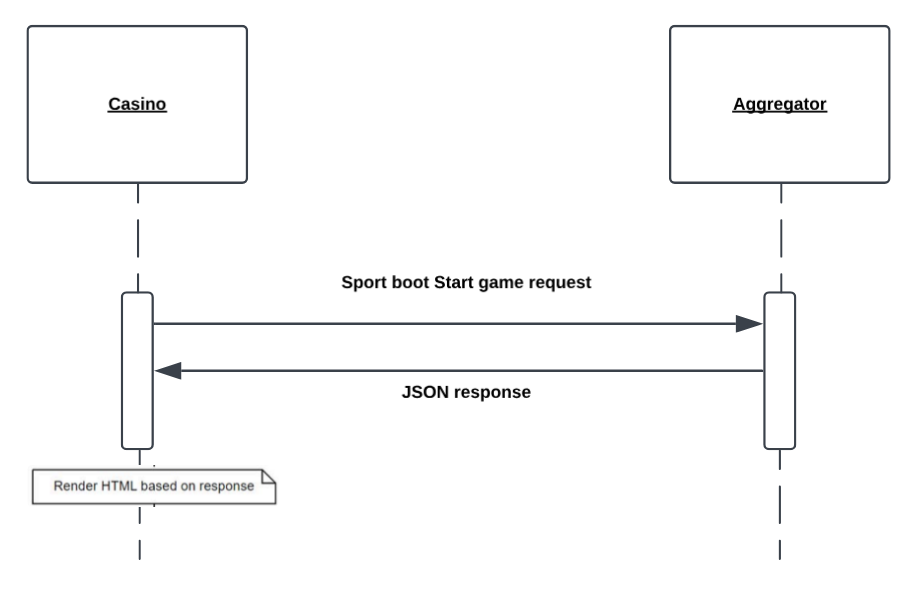
For Sportsbook products, a different launch process is used.
See [Sportsbook Start Game](/appendix-b-sportsbook-start-game/) for details.
Start Game Process Flow
The diagram below illustrates the standard game launch flow:
sequenceDiagram
participant Player
participant Casino as Casino Operator
participant Tech Fusion as Tech Fusion Platform
participant Game as Game Provider
Player->>Casino: Select Game to Play
Casino->>Tech Fusion: Start Game Request
Tech Fusion->>Tech Fusion: Validate Parameters
Tech Fusion->>Game: Initialize Game Session
Game->>Tech Fusion: Session Created
Tech Fusion->>Casino: Game URL Response
Casino->>Player: Redirect to Game URL
Player->>Game: Access Game Interface
Note over Player,Game: Player begins gameplay
Game Launch Steps
- A player selects a game to play on the casino’s platform
- The casino sends a Start Game request to the Tech Fusion API with required parameters
- Tech Fusion validates the request and creates a session with the game provider
- Tech Fusion returns a redirect URL for the specific game
- The casino redirects the player to this URL (via iframe or new tab)
- The game loads and the player begins gameplay
API Reference
Endpoint
GET https://{techfusion_domain}/game/
Request Parameters
| Parameter |
Data type |
Required |
Description |
| accountid |
String(60) -[0-9a-zA-Z] |
Yes |
Player’s unique identifier
Example: 5179068 |
| country |
String |
Yes |
Player’s location (ISO 3166-1 alpha-2 code)
Examples: IL, UK, US |
| nogsgameid |
Integer |
Yes |
Tech Fusion game identifier
Example: 80102 |
| nogslang |
String |
Yes |
Interface language (ISO format)
Example: en_US |
| nogsmode |
String |
Yes |
Game mode
Valid values: demo, real |
| nogsoperatorid |
String |
Yes |
Casino’s Tech Fusion ID
Example: 11 |
| nogscurrency |
String |
Yes |
Currency code (ISO 4217)
Example: EUR |
| sessionid |
String(64) |
Yes |
Unique session identifier
Format: {nogsoperatorid}_{uuid}
Example: 11_99d71938-c2d9-4844-b950-d598c2es |
| homeurl |
String(50) |
Yes |
URL to redirect player after game exit
Example: https://www.casino.com/games |
| historyUrl |
String(50) |
No |
URL for player game history (regulatory)
Example: https://www.casino.com/player/history |
| license |
String |
Yes |
Gaming jurisdiction
Available licenses: Curacao, Malta, UK |
| is_test_account |
Boolean |
Yes (in real mode) |
Indicates test player status
Values: true (test player), false (real player) |
| device_type |
String |
Yes |
Player’s device type
Valid values: desktop, mobile |
| exitUrl |
String |
No |
URL for reality check redirect
Example: https://www.casino.com/responsible-gaming |
| rc_url |
String |
No |
Reality check application URL
Example: `` |
| realityCheckElapsed |
Integer |
No (UKGC requirement) |
Minutes elapsed since session start
Example: 10 |
| realityCheckInterval |
Integer |
No (UKGC requirement) |
Minutes between reality checks
Example: 15 |
Note
All parameters must be URL-encoded in the request.
Example Request
GET https://{techfusion_domain}/game/?accountid=5179068&country=UK&nogsgameid=80102&nogslang=en_US&nogsmode=real&nogsoperatorid=11&nogscurrency=EUR&sessionid=11_99d71938-c2d9-4844-b950-d598c2es&homeurl=https%3A%2F%2Fwww.casino.com%2Fgames&historyUrl=https%3A%2F%2Fwww.casino.com%2Fplayer%2Fhistory&license=UK&is_test_account=false&device_type=desktop&realityCheckElapsed=0&realityCheckInterval=60
Response
Success Response
HTTP/1.1 302 Found
Location: https://game-provider.com/launch/[game-specific-parameters]
When successful, the API responds with a HTTP 302 redirect to the game launch URL. The casino should redirect the player
to this URL to start the game session.
Error Response
{
  "errMsg": "error_code",
  "details": "Human-readable error description"
}
Common error codes:
| Error Code |
Description |
| invalid_parameter |
One or more parameters are invalid or missing |
| game_unavailable |
The requested game is not available |
| unauthorized |
Invalid operator ID or other authentication issue |
| general_error |
An unexpected error occurred |
Implementation Guidelines
Browser Integration
Games can be launched in two ways:
-
Iframe Integration: Embed the game within your casino website
<iframe src="[game_url]" width="100%" height="600px" frameborder="0"></iframe>
-
New Window/Tab: Open the game in a separate browser window
window.open("[game_url]", "_blank");
Session Management
- Generate a unique session ID for each game launch
- Include the operator ID prefix in the session ID
- Store the session ID in your system for transaction correlation
- In demo mode, use
0 for both sessionid and accountid
Device Compatibility
- Specify the correct
device_type parameter to ensure proper game rendering
- Not all games support both desktop and mobile devices
- Test game launches on all target devices before production deployment
Responsible Gaming
For UK Gambling Commission (UKGC) compliance:
- Always include
realityCheckElapsed and realityCheckInterval parameters
- Provide a valid
exitUrl for reality check redirects
- Set appropriate intervals based on regulatory requirements
Troubleshooting
If you encounter issues with game launches:
- Verify all parameters are correctly formatted and URL-encoded
- Ensure the
nogsoperatorid matches your assigned Tech Fusion ID
- Check that the game ID is valid and available for your integration
- Confirm the session ID follows the required format
- Verify the player’s country is supported by the game provider
For persistent issues, contact Tech Fusion support with the full request URL and any error responses received.
Next Steps
After successfully implementing the Start Game flow, proceed to the Transaction API section to
learn how to handle in-game financial transactions.
Transaction API
Transaction API
Info
The Transaction API is the core component of the Tech Fusion platform, handling all financial interactions between games and the casino operator's wallet system.
Overview
The Transaction API facilitates real-time financial transactions between game providers and casino operators. It ensures secure, reliable, and auditable money movement for all player activities including wagers, wins, and promotional bonuses.
Every transaction is processed through standardized API calls that follow strict protocols for security, idempotency, and reconciliation. The API delivers fast, reliable, one-to-one interactions with predictable outcomes for both players and operators.
Transaction Endpoints
Base URL: https://{CasinoEndpoint}
HTTP Method: GET
Response Format: All responses are returned in JSON format
Transaction Flow
The transaction flow follows a logical sequence based on player actions within a game:
sequenceDiagram
participant Player
participant Game as Game Provider
participant Tech Fusion as Tech Fusion Platform
participant Casino as Casino Operator
Note over Player,Casino: Session Initialization
Game->>Tech Fusion: Get Account Request
Tech Fusion->>Casino: Forward Get Account Request
Casino->>Tech Fusion: Account Validation Response
Tech Fusion->>Game: Forward Account Response
Game->>Tech Fusion: Get Balance Request
Tech Fusion->>Casino: Forward Get Balance Request
Casino->>Tech Fusion: Balance Response
Tech Fusion->>Game: Forward Balance
Note over Player,Casino: Gameplay Transactions
Player->>Game: Place Bet
Game->>Tech Fusion: Wager Request
Tech Fusion->>Casino: Forward Wager Request
Casino->>Tech Fusion: Wager Response (Updated Balance)
Tech Fusion->>Game: Forward Wager Response
Game->>Player: Display Bet Placement
Player->>Game: Complete Game Round
Game->>Tech Fusion: Result Request
Tech Fusion->>Casino: Forward Result Request
Casino->>Tech Fusion: Result Response (Updated Balance)
Tech Fusion->>Game: Forward Result Response
Game->>Player: Display Outcome & Balance
alt Error Occurs
Game->>Tech Fusion: Rollback Request
Tech Fusion->>Casino: Forward Rollback Request
Casino->>Tech Fusion: Rollback Response
Tech Fusion->>Game: Forward Rollback Response
Game->>Player: Display Correction
end
alt Jackpot Win
Game->>Tech Fusion: Jackpot Request
Tech Fusion->>Casino: Forward Jackpot Request
Casino->>Tech Fusion: Jackpot Response
Tech Fusion->>Game: Forward Jackpot Response
Game->>Player: Display Jackpot Win
end
Transaction Types
The Transaction API supports several types of operations:
Security Features
- Get Account: Validates player information and session status
- Get Balance: Retrieves current player balance from the operator’s wallet
Financial Transactions
- Wager: Deducts funds from player balance for placing a bet
- Result: Adds winnings to player balance after game round completion
- Wager and Result: Combined operation for immediate bet and result processing
- Jackpot: Processes special jackpot wins
- Rollback: Reverses a previous wager transaction
Sportsbook Features
Implementation Guidelines
When implementing the Transaction API, follow these best practices:
- Idempotency: Always implement proper idempotency handling using transaction IDs to prevent duplicate processing
- Round Management: Ensure all rounds are properly closed with a ‘completed’ status
- Error Handling: Implement comprehensive error handling with appropriate response codes
- Reconciliation: Maintain detailed transaction logs for reconciliation purposes
- Security: Validate all incoming requests using secure authentication methods
- Signature Validation: Consider implementing HMAC-SHA256 signature validation for enhanced request authentication
Warning
All casino implementations must properly handle duplicate transactions. If the same transaction ID is received multiple times, return the original response with status "Success - duplicate request".
Next Steps
Review the documentation for each transaction type to understand the specific parameters, request formats, and response structures required for implementation. Start with the Get Account and Get Balance endpoints which form the foundation of all player interactions.
Subsections of Transaction API
Signature Validation
Overview
The Transaction API supports an optional security feature using HMAC-SHA256 cryptographic signatures to ensure request
authenticity and prevent tampering. When enabled, all transaction requests must include a valid signature in the
X-Groove-Signature header.
Info
This security feature is optional and must be enabled by your account manager. Once enabled, all transaction API
requests must include the signature header.
Supported Endpoints
The signature validation applies to all transaction endpoints:
- GetAccount - Validate player session
- GetBalance - Retrieve player balance
- Wager - Process bet placement
- Result - Process game outcome
- WagerAndResult - Combined bet and result
- Jackpot - Process jackpot wins
- Rollback - Reverse transactions
- ReverseWin - Reverse win transactions
- RollbackRollback - Reverse rollback operations
- WagerByBatch - Process batch betting (POST request)
Setup
1. Security Key Provision
Your account manager will provide a unique security key for generating HMAC-SHA256 signatures. This key must be kept
secure and never exposed in client-side code.
All requests must include the signature in the request header:
X-Groove-Signature: <generated_signature>
Hash Creation Process
Step 1: Parameter Concatenation
Concatenate all query parameter values (not names) in lexicographical order based on the parameter names:
Warning
**Important Rules:**
- Sort parameters alphabetically by their **names**
- Concatenate only the **values** (not the names)
- **Exclude** the `request` query parameter
- Treat `nogsgameid` as `gameid` for sorting purposes
- Include `frbId` parameter for free spin requests (Result, Wager, WagerAndResult)
- For WagerByBatch (POST), use only query parameters, not the request body
Step 2: Generate HMAC-SHA256
Use the concatenated string and your security key to generate the HMAC-SHA256 signature:
signature = HMAC_SHA256(concatenated_values, security_key)
Signature Validation Flow
flowchart TD
A[Game sends request with X-Groove-Signature header] --> B[Casino receives request]
B --> C[Extract query parameters]
C --> D[Sort parameters alphabetically]
D --> E[Concatenate values]
E --> F[Generate HMAC-SHA256 with security key]
F --> G{Signature matches header?}
G -->|Yes| H[Process transaction]
G -->|No| I[Return error 1001]
H --> J[Return success response]
I --> K[Invalid signature response]
style I fill:#f96
style K fill:#f96
style H fill:#9f6
style J fill:#9f6
Error Response
If signature validation fails, the server returns:
{
  "code": 1001,
  "status": "Invalid signature",
  "message": "invalid signature"
}
Implementation Examples
Python
import hmac
import hashlib
from urllib.parse import urlparse, parse_qs


def generate_signature(url, security_key):
    # Parse URL and extract query parameters
    parsed = urlparse(url)
    params = parse_qs(parsed.query)

    # Create parameter dictionary (handle single values)
    param_dict = {}
    for key, value_list in params.items():
        # Skip 'request' parameter
        if key == 'request':
            continue
        # Treat 'nogsgameid' as 'gameid' for sorting
        sort_key = 'gameid' if key == 'nogsgameid' else key
        param_dict[sort_key] = value_list[0] if value_list else ''

    # Sort parameters alphabetically and concatenate values
    sorted_params = sorted(param_dict.items())
    concatenated = ''.join([value for key, value in sorted_params])

    # Generate HMAC-SHA256
    signature = hmac.new(
        security_key.encode('utf-8'),
        concatenated.encode('utf-8'),
        hashlib.sha256
    ).hexdigest()

    return signature


# Example usage
security_key = "test_key"
url = "?request=wager&gamesessionid=123_jdhdujdk&accountid=111&device=desktop&gameid=80102&apiversion=1.2&betamount=10.0&roundid=nc8n4nd87&transactionid=trx_id"
signature = generate_signature(url, security_key)
print(f"X-Groove-Signature: {signature}")
Golang
package main

import (
	"crypto/hmac"
	"crypto/sha256"
	"encoding/hex"
	"net/url"
	"sort"
	"strings"
)

func generateSignature(requestURL string, securityKey string) string {
	// Parse URL
	u, _ := url.Parse(requestURL)
	params := u.Query()

	// Create parameter map for sorting
	paramMap := make(map[string]string)
	for key, values := range params {
		// Skip 'request' parameter
		if key == "request" {
			continue
		}
		// Treat 'nogsgameid' as 'gameid' for sorting
		sortKey := key
		if key == "nogsgameid" {
			sortKey = "gameid"
		}
		if len(values) > 0 {
			paramMap[sortKey] = values[0]
		}
	}

	// Sort keys alphabetically
	var keys []string
	for k := range paramMap {
		keys = append(keys, k)
	}
	sort.Strings(keys)

	// Concatenate values in sorted order
	var concatenated strings.Builder
	for _, key := range keys {
		concatenated.WriteString(paramMap[key])
	}

	// Generate HMAC-SHA256
	h := hmac.New(sha256.New, []byte(securityKey))
	h.Write([]byte(concatenated.String()))
	signature := hex.EncodeToString(h.Sum(nil))

	return signature
}

// Example usage
func main() {
	securityKey := "test_key"
	url := "?request=wager&gamesessionid=123_jdhdujdk&accountid=111&device=desktop&gameid=80102&apiversion=1.2&betamount=10.0&roundid=nc8n4nd87&transactionid=trx_id"
	signature := generateSignature(url, securityKey)
	fmt.Printf("X-Groove-Signature: %s\n", signature)
}
Java
import javax.crypto.Mac;
import javax.crypto.spec.SecretKeySpec;
import java.net.URLDecoder;
import java.nio.charset.StandardCharsets;
import java.util.LinkedHashMap;
import java.util.Map;
import java.util.TreeMap;

public class SignatureService {

    public static String generateSignature(String url, String securityKey) throws Exception {
        // Parse query parameters
        String query = url.substring(url.indexOf("?") + 1);
        Map<String, String> params = new LinkedHashMap<>();

        for (String param : query.split("&")) {
            String[] keyValue = param.split("=");
            String key = URLDecoder.decode(keyValue[0], StandardCharsets.UTF_8.name());
            String value = keyValue.length > 1 ?
                    URLDecoder.decode(keyValue[1], StandardCharsets.UTF_8.name()) : "";

            // Skip 'request' parameter
            if (!key.equals("request")) {
                // Treat 'nogsgameid' as 'gameid' for sorting
                String sortKey = key.equals("nogsgameid") ? "gameid" : key;
                params.put(sortKey, value);
            }
        }

        // Sort parameters alphabetically
        Map<String, String> sortedParams = new TreeMap<>(params);

        // Concatenate values
        StringBuilder concatenated = new StringBuilder();
        for (String value : sortedParams.values()) {
            concatenated.append(value);
        }

        // Generate HMAC-SHA256
        Mac mac = Mac.getInstance("HmacSHA256");
        SecretKeySpec secretKey = new SecretKeySpec(
                securityKey.getBytes(StandardCharsets.UTF_8),
                "HmacSHA256"
        );
        mac.init(secretKey);
        byte[] hash = mac.doFinal(concatenated.toString().getBytes(StandardCharsets.UTF_8));

        // Convert to hex string
        StringBuilder hexString = new StringBuilder();
        for (byte b : hash) {
            String hex = Integer.toHexString(0xff & b);
            if (hex.length() == 1) hexString.append('0');
            hexString.append(hex);
        }

        return hexString.toString();
    }

    // Example usage
    public static void main(String[] args) throws Exception {
        String securityKey = "test_key";
        String url = "?request=wager&gamesessionid=123_jdhdujdk&accountid=111&device=desktop&gameid=80102&apiversion=1.2&betamount=10.0&roundid=nc8n4nd87&transactionid=trx_id";
        String signature = generateSignature(url, securityKey);
        System.out.println("X-Groove-Signature: " + signature);
    }
}
Example Signatures
Using security key: "test_key"
| Request Type |
URL |
Concatenated Values |
Signature |
| GetAccount |
?request=getaccount&gamesessionid=123_jdhdujdk&accountid=111&device=desktop&apiversion=1.2 |
1111.2desktop123_jdhdujdk |
be426d042cd71743970779cd6ee7881d71d1f0eb769cbe14a0081c29c8ef2a09 |
| GetBalance |
?request=getbalance&gamesessionid=123_jdhdujdk&accountid=111&device=desktop&nogsgameid=80102&apiversion=1.2 |
1111.2desktop80102123_jdhdujdk |
434e2b4545299886c8891faadd86593ad8cbf79e5cd20a6755411d1d3822abba |
| Wager |
?request=wager&gamesessionid=123_jdhdujdk&accountid=111&device=desktop&gameid=80102&apiversion=1.2&betamount=10.0&roundid=nc8n4nd87&transactionid=trx_id |
1111.210.0desktop80102123_jdhdujdkwagernc8n4nd87trx_id |
f6d980dfe7866b6676e6565ccca239f527979d702106233bb6f72a654931b3bc |
| WagerAndResult |
?request=wagerAndResult&gamesessionid=123_jdhdujdk&accountid=111&device=desktop&gameid=80102&apiversion=1.2&result=10.0&roundid=nc8n4nd87&transactionid=trx_id |
1111.2desktop80102123_jdhdujdkwagerAndResult10.0nc8n4nd87trx_id |
bba4df598cf50ec69ebe144c696c0305e32f1eef76eb32091585f056fafd9079 |
| Result |
?request=result&gamesessionid=123_jdhdujdk&accountid=111&device=desktop&gameid=80102&apiversion=1.2&result=10.0&roundid=nc8n4nd87&transactionid=trx_id |
1111.2desktop80102123_jdhdujdkresult10.0nc8n4nd87trx_id |
d9655083f60cfd490f0ad882cb01ca2f9af61e669601bbb1dcced8a5dca1820f |
| Rollback |
?request=rollback&gamesessionid=123_jdhdujdk&accountid=111&device=desktop&gameid=80102&apiversion=1.2&rollbackamount=10.0&roundid=nc8n4nd87&transactionid=trx_id |
1111.2desktop80102123_jdhdujdkrollback10.0nc8n4nd87trx_id |
5ecbc1d5c6bd0ad172c859da01cb90746a61942bdf6f878793a80af7539719e5 |
| Jackpot |
?request=jackpot&gamesessionid=123_jdhdujdk&accountid=111&device=desktop&gameid=80102&apiversion=1.2&amount=10.0&roundid=nc8n4nd87&transactionid=trx_id |
11110.01.2desktop80102123_jdhdujdkjackpotnc8n4nd87trx_id |
d4cc7c2a2ed2f33657e2c24e0c32c5ead980f793e2ce81eb00316f0544a45048 |
| ReverseWin |
?request=reversewin&gamesessionid=123_jdhdujdk&accountid=111&device=desktop&gameid=80102&amount=10.0&roundid=nc8n4nd87&transactionid=trx_id&wintransactionid=win_trx_id&apiversion=1.2 |
11110.01.2desktop80102123_jdhdujdkreversewinnc8n4nd87trx_idwin_trx_id |
0e96af62a1fee9e6dfbdbda06bc068a6cf2eb18152e02e39c3af70aecb5d04d7 |
| RollbackRollback |
?request=rollbackrollback&gamesessionid=123_jdhdujdk&accountid=111&device=desktop&gameid=80102&rollbackAmount=10.0&roundid=nc8n4nd87&transactionid=trx_id&apiversion=1.2 |
1111.2desktop80102123_jdhdujdkrollbackrollback10.0nc8n4nd87trx_id |
ecaeae75702f548f788c92c06804e59d11719a70302704b36ef72d607e180327 |
| WagerByBatch |
POST ?request=wagerbybatch&request_id=batch_001&gamesessionid=1501_xyz&gameid=82602&apiversion=1.2 |
1.2826021501_xyzbatch_001 |
8a5d4e9f3b2c1a7e6d5c4b3a2918f7e6d5c4b3a2918f7e6d5c4b3a2918f7e6 |
Tip
**Free Spin Requests**: For Result, Wager, and WagerAndResult endpoints, when processing free spin requests, include the
`frbId` parameter in the signature calculation.
**WagerByBatch**: This is a POST request. Only query parameters are used for signature calculation - the JSON request
body is NOT included in the signature.
Security Best Practices
-
Key Management
- Store security keys in secure configuration management systems
- Never hardcode keys in source code
- Rotate keys periodically
- Use different keys for different environments (staging, production)
-
Implementation Security
- Always validate signatures server-side
- Implement request timeout mechanisms
- Log all signature validation failures for security monitoring
- Use HTTPS for all API communications
-
Error Handling
- Never expose security keys in error messages
- Log detailed errors server-side for debugging
- Return generic error messages to clients
-
Testing
- Test with the provided example signatures
- Verify parameter sorting logic thoroughly
- Test edge cases (empty values, special characters)
- Validate handling of the
nogsgameid to gameid conversion
Troubleshooting
Common Issues
| Issue |
Solution |
| Signature mismatch |
Verify parameter sorting order and that ‘request’ parameter is excluded |
| Special characters |
Ensure proper URL decoding before concatenation |
nogsgameid parameter |
Remember to treat as ‘gameid’ for sorting |
| Empty parameter values |
Include empty strings in concatenation |
| Case sensitivity |
Parameter names are case-sensitive |
Debugging Steps
- Log the concatenated string before hashing
- Verify the security key is correct
- Check parameter extraction and sorting
- Ensure proper character encoding (UTF-8)
- Validate the HMAC-SHA256 implementation
Migration Guide
If you’re migrating from an unsecured implementation:
- Phase 1: Implement signature generation in your application
- Phase 2: Test with provided examples in staging environment
- Phase 3: Enable signature validation with your account manager
- Phase 4: Deploy to production with monitoring
- Phase 5: Monitor error rates and adjust as needed
Warning
Once signature validation is enabled, all requests without valid signatures will be rejected. Ensure your implementation
is thoroughly tested before enabling this feature in production.
Get Account
Get Account
Info
The Get Account endpoint retrieves player profile information required for gameplay, including unique ID, currency,
location, and account balances.
Overview
The Get Account method is typically the first transaction API call made when a player launches a game. It verifies the
player’s session and returns essential player details needed for the game to function correctly. Game providers use this
information to configure the game session, set currency display, and initialize the player’s balance.
Flow Diagram
sequenceDiagram
participant Player
participant Game as Game Provider
participant Tech Fusion as Tech Fusion Platform
participant Casino as Casino Operator
Player->>Game: Launch Game
Game->>Tech Fusion: Get Account Request
Tech Fusion->>Casino: Forward Get Account Request
Casino->>Casino: Validate Session
Casino->>Casino: Retrieve Player Details
Casino->>Tech Fusion: Player Account Response
Tech Fusion->>Game: Forward Account Response
Game->>Player: Initialize Game with Player Settings
Casino Responsibilities
The casino platform must perform the following operations when processing a Get Account request:
-
Session Validation
- Confirm the incoming game session ID is valid
- Verify the session is associated with the provided account ID
- Reject the request if validation fails
-
Player Data Retrieval
- Return consistent player identifiers for the same player across sessions
- Provide accurate player location information
- Return the current player balances (real money and bonus)
- Include the correct currency setting for the player
-
Consistency Requirements
- The account ID must be unique per player and consistent across sessions
- This is particularly important for retry and rollback operations
Request Details
Endpoint
{casino_endpoint}?request=getaccount&[parameters]
Request Parameters
| Parameter |
Data type |
Required |
Description |
| accountid |
String(60) - [0-9a-zA-Z] |
Yes |
Player’s unique identifier
Example: 5179068 |
| apiversion |
String |
Yes |
API version
Example: 1.2 |
| device |
String |
Yes |
Player’s device type
Valid values: desktop, mobile |
| gamesessionid |
String(64) |
Yes |
Game session ID
Example: 11_99d71938-c2d9-4844-b950-d598c2es |
| request |
String |
Yes |
Request method name
Value: getaccount |
Example Request
GET {casino_endpoint}?request=getaccount&gamesessionid=123_jdhdujdk&accountid=111&device=desktop&apiversion=1.2
Response Details
Response Parameters
| Parameter |
Data type |
Required |
Description |
| accountid |
String |
Yes |
Player’s unique identifier
Example: 5179068 |
| apiversion |
String |
Yes |
API version
Example: 1.2 |
| city |
String(32) |
Yes |
Player’s city location
Examples: London, Tel Aviv |
| code |
Integer |
Yes |
Response code (see Appendix)
Example: 200 |
| country |
String |
Yes |
Player’s country (ISO 3166-1 alpha-2 code)
Examples: IL, UK, US |
| currency |
String |
Yes |
Player’s currency (ISO 4217 code)
Example: EUR |
| gamesessionid |
String(64) |
Yes |
Game session ID (should be the same as in game launch)
Example: 11_99d71938-c2d9-4844-b950-d598c2es |
| real_balance |
Decimal (32,10) with max 2 decimal places |
Yes |
Player’s real money balance
Example: 100.00 |
| bonus_balance |
Decimal (32,10) with max 2 decimal places |
Yes |
Player’s bonus balance
Example: 50.00 |
| status |
String |
Yes |
Response status (see Appendix)
Example: Success |
| game_mode |
Integer |
Yes* |
Game mode:
1 - Real money mode
2 - Bonus mode
*Required for CMA-compliant games |
| order |
String |
Yes* |
Order type:
cash_money - Real money
bonus_money - Bonus money
*Required for CMA-compliant games |
Note
**Note on Cryptocurrencies**: For Fugaso game provider, the following cryptocurrencies are also supported: BTC, LTC,
DOG, ETH, BCH, USDT, and XRP.
Example Success Response
{
  "code": 200,
  "status": "Success",
  "accountid": "8877",
  "city": "London",
  "country": "GB",
  "currency": "EUR",
  "gamesessionid": "11_99d71938-c2d9-4844-b950-d598c2es",
  "real_balance": 100.00,
  "bonus_balance": 50.00,
  "game_mode": 1,
  "order": "cash_money",
  "apiversion": "1.2"
}
Error Handling
Common Error Codes
| Code |
Status |
Description |
| 1 |
Technical error |
Internal server error |
| 1000 |
Not logged on |
Player session is invalid or expired |
| 1003 |
Authentication failed |
Invalid session credentials or account mismatch |
Tip
For a complete list of error codes, refer
to [Appendix A: Transaction Response Status Codes](/appendix-a-transaction-response-status-codes/).
Implementation Notes
-
Player Identification:
- The
accountid must be consistent for the same player across different sessions
- This consistency is crucial for transaction reconciliation and player tracking
-
Location Information:
- The
country parameter uses ISO 3166-1 alpha-2 country codes (e.g., US, GB, DE)
- Location data is used for regulatory compliance and localization
-
Currency Handling:
- The
currency parameter uses ISO 4217 currency codes (e.g., EUR, USD, GBP)
- Cryptocurrency support varies by game provider
- Games will display monetary values in the specified currency format
-
CMA Compliance:
- For UK Gambling Commission (UKGC) regulated operators,
game_mode and order parameters are required
- These parameters control how funds are consumed for wagers (real money vs. bonus money)
Security
When Signature Validation is enabled:
- Include the
X-Groove-Signature header in your request
- Calculate signature using query parameters (excluding
request)
- See Signature Validation for detailed implementation
Signature Example
For the request:
GET {casino_endpoint}?request=getaccount&gamesessionid=123_jdhdujdk&accountid=111&device=desktop&apiversion=1.2
Query parameters for signature (alphabetically sorted):
accountid: “111”apiversion: “1.2”device: “desktop”gamesessionid: “123_jdhdujdk”
Concatenated values: 1111.2desktop123_jdhdujdk
With security key "test_key", the signature would be:
X-Groove-Signature: be426d042cd71743970779cd6ee7881d71d1f0eb769cbe14a0081c29c8ef2a09
- Get Balance - Retrieves current player balance
- Wager - Places a bet and updates player balance
- Result - Updates player balance after a game round completes
Get Balance
Get Balance
Info
The Get Balance endpoint retrieves the current balance for a player's account. This is used by games to display the
player's up-to-date balance during gameplay.
Overview
The Get Balance method allows game providers to request the current balance for a specific player. This is typically
called at various points during gameplay to ensure the player’s displayed balance is accurate. The casino returns both
the real money balance and any bonus funds available to the player.
Flow Diagram
sequenceDiagram
participant Player
participant Game as Game Provider
participant Tech Fusion as Tech Fusion Platform
participant Casino as Casino Operator
Note over Player,Game: Player views balance in game
Game->>Tech Fusion: Get Balance Request
Tech Fusion->>Casino: Forward Get Balance Request
Casino->>Casino: Validate Session
Casino->>Casino: Retrieve Current Balance
Casino->>Tech Fusion: Balance Response
Tech Fusion->>Game: Forward Balance Response
Game->>Player: Display Updated Balance
Casino Responsibilities
The casino platform must perform the following operations when processing a Get Balance request:
-
Session Validation
- Confirm the incoming game session ID is valid
- Verify the session is associated with the provided account ID
- Reject the request if validation fails
-
Balance Retrieval
- Retrieve the player’s current real money balance
- Retrieve the player’s current bonus balance (if applicable)
- Calculate the total balance (real + bonus)
-
Response Formatting
- Return all balance values with consistent decimal precision
- Include any required CMA-compliance parameters if applicable
Request Details
Endpoint
{casino_endpoint}?request=getbalance&[parameters]
Request Parameters
| Parameter |
Data type |
Required |
Description |
| accountid |
String(60) - [0-9a-zA-Z] |
Yes |
Player’s unique identifier
Example: 5179068 |
| apiversion |
String |
Yes |
API version
Example: 1.2 |
| device |
String |
Yes |
Player’s device type
Valid values: desktop, mobile |
| gamesessionid |
String(64) |
Yes |
Game session ID
Example: 11_99d71938-c2d9-4844-b950-d598c2es |
| nogsgameid |
String |
Yes |
game ID
Example: 80102 |
| request |
String |
Yes |
Request method name
Value: getbalance |
Example Request
GET {casino_endpoint}?request=getbalance&gamesessionid=123_jdhdujdk&accountid=111&device=desktop&nogsgameid=80102&apiversion=1.2
Response Details
Response Parameters
| Parameter |
Data type |
Required |
Description |
| apiversion |
String |
Yes |
API version
Example: 1.2 |
| balance |
Decimal (32,10) with max 2 decimal places |
Yes |
Total player balance (real + bonus)
Examples: 500.00, 140.25 |
| bonus_balance |
Decimal (32,10) with max 2 decimal places |
Yes |
Player’s bonus balance
Example: 50.00 |
| code |
Integer |
Yes |
Response code (see Appendix)
Example: 200 |
| real_balance |
Decimal (32,10) with max 2 decimal places |
Yes |
Player’s real money balance
Example: 100.00 |
| status |
String |
Yes |
Response status (see Appendix)
Example: Success |
| game_mode |
Integer |
Yes* |
Game mode:
1 - Real money mode
2 - Bonus mode
*Required for CMA-compliant games |
| order |
String |
Yes* |
Order type:
cash_money - Real money
bonus_money - Bonus money
*Required for CMA-compliant games |
Note
**Note:** The `balance` value must always equal the sum of `real_balance` and `bonus_balance`.
Example Success Response
{
  "code": 200,
  "status": "Success",
  "balance": 100.00,
  "bonus_balance": 50.00,
  "real_balance": 50.00,
  "game_mode": 1,
  "order": "cash_money",
  "apiversion": "1.2"
}
Example Error Response
{
  "code": 1,
  "status": "Technical error",
  "message": "Technical error",
  "apiversion": "1.2"
}
Error Handling
Common Error Codes
| Code |
Status |
Description |
| 1 |
Technical error |
Internal server error |
| 110 |
Operation not allowed |
Invalid session or account ID |
| 1000 |
Not logged on |
Player session is invalid or expired |
Tip
For a complete list of error codes, refer
to [Appendix A: Transaction Response Status Codes](/appendix-a-transaction-response-status-codes/).
Implementation Notes
-
Balance Calculation:
- The
balance value must equal the sum of real_balance and bonus_balance
- For casinos that don’t use bonus balances, set
bonus_balance to 0.00
-
Frequency of Calls:
- Games typically call Get Balance after every significant player action
- Balance may be polled periodically during gameplay
- Balance should always be refreshed after financial transactions (wagers, results)
-
Error Handling:
- If a player’s session has expired, return code
1000 Not logged on
- This allows the game to prompt the player to log in again if needed
-
Balance Fields:
- All balance fields should be returned (balance, bonus_balance, real_balance)
Security
When Signature Validation is enabled:
- Include the
X-Groove-Signature header in your request
- Calculate signature using query parameters (excluding
request)
- Remember to treat
nogsgameid as gameid for sorting purposes
- See Signature Validation for detailed implementation
Signature Example
For the request:
GET {casino_endpoint}?request=getbalance&gamesessionid=123_jdhdujdk&accountid=111&device=desktop&nogsgameid=80102&apiversion=1.2
Query parameters for signature (alphabetically sorted, treating nogsgameid as gameid):
accountid: “111”apiversion: “1.2”device: “desktop”gameid (from nogsgameid): “80102”gamesessionid: “123_jdhdujdk”
Concatenated values: 1111.2desktop80102123_jdhdujdk
With security key "test_key", the signature would be:
X-Groove-Signature: 434e2b4545299886c8891faadd86593ad8cbf79e5cd20a6755411d1d3822abba
- Get Account - Retrieves player account information
- Wager - Updates player balance when placing a bet
- Result - Updates player balance after a game round completes
Wager
Wager Transaction
Info
The Wager transaction is used to place a bet on behalf of a player. This transaction deducts funds from the player's
balance at the casino.
Overview
The Wager method represents a player placing a bet in a game. When a player initiates a betting action, the game
provider sends a Wager request to the Tech Fusion platform, which then forwards it to the casino operator. The casino
processes the request by validating the player’s session, checking available funds, and updating the player’s balance
accordingly.
Warning
**Important:** Wager requests implement idempotency controls. This means the same wager request should only be processed
once. If a duplicate request is received, the system must return the original response with status code 200 and the "
Success - duplicate request" status.
Flow Diagram
sequenceDiagram
participant Player
participant Game as Game Provider
participant Tech Fusion as Tech Fusion Platform
participant Casino as Casino Operator
Player->>Game: Place Bet
Game->>Tech Fusion: Wager Request
Tech Fusion->>Casino: Forward Wager Request
Casino->>Casino: Validate Session
Casino->>Casino: Check Available Funds
Casino->>Casino: Check Gaming Limits
Casino->>Casino: Check Idempotency
Casino->>Casino: Update Balance
Casino->>Tech Fusion: Wager Response
Tech Fusion->>Game: Forward Response
Game->>Player: Display Updated Balance
Casino Responsibilities
The casino platform must perform the following operations when processing a Wager request:
-
Session Validation
- Confirm the incoming game session ID is valid
- Verify the session is associated with the provided account ID
- Reject the wager if validation fails
-
Transaction Validation
- Verify sufficient funds are available
- Check that the player is within responsible gaming limits
- Determine if the transaction has already been processed
-
Idempotency Check
- Check if a request with the same
transactionid has been processed before
- If any essential fields mismatch (
transactionid, accountid, or betamount), return “Transaction parameter
mismatch”
- If no mismatches, return the original response with status “200 Success - duplicate request”
-
Transaction Storage
- Store transaction details to handle future Result and Rollback calls
- Important fields to store:
gamesessionid, accountid, roundid, transactionid, and betamount
Request Details
Endpoint
{casino_endpoint}?request=wager&[parameters]
Request Parameters
| Parameter |
Data type |
Required |
Description |
| accountid |
String(60) - [0-9a-zA-Z] |
Yes |
Player’s unique identifier
Example: 5179068 |
| apiversion |
String |
Yes |
API version
Example: 1.2 |
| betamount |
Decimal (32,10) |
Yes |
Wager amount (real + bonus funds)
Examples: 2.00, 0.40, 0.01 |
| device |
String |
Yes |
Player’s device type
Valid values: desktop, mobile |
| gameid |
String |
Yes |
game ID
Example: 80102 |
| gamesessionid |
String(64) |
Yes |
Game session ID from start game method
Example: 11_99d71938-c2d9-4844-b950-d598c2es |
| request |
String |
Yes |
Request method name
Value: wager |
| roundid |
String(255) |
Yes |
Round identifier
Example: 802d1812c32686748f2afbcacfcc82114cf |
| transactionid |
String(255) |
Yes |
Unique transaction identifier
Example: 7617edd0924c11e7abb2865556898ad0re |
| frbid |
String(255) |
No |
Free Round Bonus ID (if applicable)
Example: 12a345b78 |
Example Request
GET {casino_endpoint}?request=wager&gamesessionid=123_jdhdujdk&accountid=111&device=desktop&gameid=80102&apiversion=1.2&betamount=10.0&roundid=nc8n4nd87&transactionid=trx_id
Response Details
Response Parameters
| Parameter |
Data type |
Required |
Description |
| accounttransactionid |
String(50) |
Yes |
Casino’s internal transaction ID
Example: 7617edd0924c11e7abb2865556898ad0 |
| apiversion |
String |
Yes |
API version
Example: 1.2 |
| balance |
Decimal (32,10) |
Yes |
Total player balance (real + bonus)
Examples: 500.00, 140.25 |
| bonus_balance |
Decimal (32,10) |
Yes |
Player’s bonus balance
Example: 50.00 |
| bonusmoneybet |
Decimal (32,10) |
Yes |
Portion of bet from bonus funds
Example: 0.00 |
| code |
Integer |
Yes |
Response code (see Appendix)
Example: 200 |
| real_balance |
Decimal (32,10) |
Yes |
Player’s real money balance
Example: 100.00 |
| realmoneybet |
Decimal (32,10) |
Yes |
Portion of bet from real money
Example: 10.00 |
| status |
String |
Yes |
Response status (see Appendix)
Example: Success |
| game_mode |
Integer |
Yes* |
Game mode:
1 - Real money mode
2 - Bonus mode
*Required for CMA-compliant games |
| order |
String |
Yes* |
Order type:
cash_money - Real money
bonus_money - Bonus money
*Required for CMA-compliant games |
Note
**Note:** The sum of `bonusmoneybet` and `realmoneybet` must equal the total `betamount` specified in the request. If
your casino does not use bonuses, set `bonusmoneybet` to 0.
Example Success Response
{
  "code": 200,
  "status": "Success",
  "accounttransactionid": "aaaaaaa",
  "balance": 100.00,
  "bonusmoneybet": 0.00,
  "realmoneybet": 10.00,
  "bonus_balance": 50.00,
  "real_balance": 50.00,
  "game_mode": 1,
  "order": "cash_money",
  "apiversion": "1.2"
}
Error Handling
Common Error Codes
| Code |
Status |
Description |
| 1 |
Technical error |
Internal server error |
| 110 |
Operation not allowed |
This error occurs when:
• The wager amount is negative
• Player account not found
• Account ID doesn’t match session ID |
| 400 |
Transaction operator mismatch |
Transaction belongs to a different operator |
| 409 |
Round closed or transaction ID exists |
The round is already closed or this transaction ID has been used |
| 1000 |
Not logged on |
Player session is invalid or expired |
| 1006 |
Out of money |
Insufficient funds to place the wager |
| 1019 |
Gaming limit |
Player has exceeded betting limits:
• Loss limit exceeded
• Overall bet limit exceeded |
| 1035 |
Account blocked |
Player account is suspended or blocked |
Tip
For a complete list of error codes, refer
to [Appendix A: Transaction Response Status Codes](/appendix-a-transaction-response-status-codes/).
Implementation Notes
-
Idempotency Handling:
- Always store transaction IDs to identify duplicate requests
- Return the original response for duplicate transactions with the same transaction ID
- Only the balance fields may change in duplicate responses (as player balance may have changed due to other
transactions)
-
Transaction Storage:
- Store wager details to validate future Result and Rollback calls
- Key data includes: session ID, account ID, round ID, transaction ID, and bet amount
-
Error Handling:
- Return appropriate error codes based on validation results
- Include detailed error messages for troubleshooting
-
Free Round Bonuses:
- If the wager is part of a Free Round Bonus, include the
frbid parameter
- For FRB wagers, the bet amount is typically 0 in real money mode
Security
When Signature Validation is enabled:
- Include the
X-Groove-Signature header in your request
- Calculate signature using query parameters (excluding
request)
- Include
frbid parameter if present (for free round bonuses)
- See Signature Validation for detailed implementation
Signature Example
For the request:
GET {casino_endpoint}?request=wager&gamesessionid=123_jdhdujdk&accountid=111&device=desktop&gameid=80102&apiversion=1.2&betamount=10.0&roundid=nc8n4nd87&transactionid=trx_id
Query parameters for signature (alphabetically sorted):
accountid: “111”apiversion: “1.2”betamount: “10.0”device: “desktop”gameid: “80102”gamesessionid: “123_jdhdujdk”roundid: “nc8n4nd87”transactionid: “trx_id”
Concatenated values: 1111.210.0desktop80102123_jdhdujdknc8n4nd87trx_id
With security key "test_key", the signature would be:
X-Groove-Signature: f6d980dfe7866b6676e6565ccca239f527979d702106233bb6f72a654931b3bc
- Result - Used after a wager to add winnings to the player’s balance
- Wager and Result - Combined operation for immediate bet and win
- Rollback - Used to reverse a wager transaction if needed
Result
Result Transaction
Info
The Result transaction is used to report the outcome of a game round and add any winnings to the player's balance.
Overview
The Result method is called by the game provider to inform the casino that a game round has completed and to report the
outcome. If the player wins, the Result transaction adds the winning amount to the player’s balance. If the player
loses, a result value of 0 is sent, indicating no additional funds should be added to the player’s balance.
Note
- Result requests may be received after the player goes offline
- Result requests may be received without a preceding wager request for Free Round Bonuses (FRB), tournament
auto-payouts or similar scenarios
- A game round may have multiple Result transactions, but only one with status "completed"
Flow Diagram
sequenceDiagram
participant Player
participant Game as Game Provider
participant Tech Fusion as Tech Fusion Platform
participant Casino as Casino Operator
Player->>Game: Complete Game Round
Game->>Tech Fusion: Result Request
Tech Fusion->>Casino: Forward Result Request
Casino->>Casino: Check Idempotency
Casino->>Casino: Update Player Balance
Casino->>Tech Fusion: Result Response
Tech Fusion->>Game: Forward Response
Game->>Player: Display Win Amount & Updated Balance
Note over Player,Casino: If game status is "completed", the round is closed
Casino Responsibilities
The casino platform must perform the following operations when processing a Result request:
-
Session Validation
- Confirm the incoming game session ID is valid
- Verify the session is associated with the provided account ID
-
Idempotency Check
- Check if a request with the same
transactionid has been processed before
- If any essential fields mismatch (
transactionid, accountid, or result), return “Transaction parameter
mismatch”
- If no mismatches, return the original response with status “200 Success - duplicate request”
-
Round Validation
- Confirm that the incoming
accountid and roundid match a previously placed wager
- For FRB or tournament payouts, a Result may be received without a previous Wager
-
Session Expiry Handling
- A Result must be accepted even if the game session has expired
- Return code
1000 Not logged on is never a valid response to a Result call
-
Game Status Processing
- If
gamestatus is “completed”, mark the round as closed
- If
gamestatus is “pending”, the round remains open for additional Result transactions
Request Details
Endpoint
{casino_endpoint}?request=result&[parameters]
Request Parameters
| Parameter |
Data type |
Required |
Description |
| accountid |
String(60) - [0-9a-zA-Z] |
Yes |
Player’s unique identifier
Example: 5179068 |
| apiversion |
String |
Yes |
API version
Example: 1.2 |
| device |
String |
Yes |
Player’s device type
Valid values: desktop, mobile |
| gameid |
String |
Yes |
game ID
Example: 80102 |
| gamesessionid |
String(64) |
Yes |
Game session ID
Example: 11_99d71938-c2d9-4844-b950-d598c2es |
| gamestatus |
String |
Yes |
Game status
Valid values: completed, pending |
| request |
String |
Yes |
Request method name
Value: result |
| result |
Decimal (32,10) |
Yes |
Win amount (0 if player lost)
Example: 2.25 |
| roundid |
String(255) |
Yes |
Round identifier
Example: 802d1812c32686748f2afbcacfcc82114cf |
| transactionid |
String(255) |
Yes |
Unique transaction identifier
Example: 7617edd0924c11e7abb2865556898ad0re |
| frbid |
String(255) |
No |
Free Round Bonus ID (if applicable)
Example: 12a345b78 |
Example Request
GET {casino_endpoint}?request=result&gamesessionid=123_jdhdujdk&accountid=111&device=desktop&gameid=80102&apiversion=1.2&result=10.0&roundid=nc8n4nd87&transactionid=trx_id&gamestatus=completed
Response Details
Response Parameters
| Parameter |
Data type |
Required |
Description |
| apiversion |
String |
Yes |
API version
Example: 1.2 |
| balance |
Decimal (32,10) |
Yes |
Total player balance (real + bonus)
Examples: 500.00, 140.25 |
| bonus_balance |
Decimal (32,10) |
Yes |
Player’s bonus balance
Example: 50.00 |
| bonusWin |
Decimal (32,10) |
Yes |
Portion of win allocated to bonus funds
Example: 0.00 |
| code |
Integer |
Yes |
Response code (see Appendix)
Example: 200 |
| real_balance |
Decimal (32,10) |
Yes |
Player’s real money balance
Example: 100.00 |
| realMoneyWin |
Decimal (32,10) |
Yes |
Portion of win allocated to real money
Example: 10.00 |
| status |
String |
Yes |
Response status (see Appendix)
Example: Success |
| walletTx |
String(50) |
Yes |
Casino’s wallet transaction ID
Example: de73550e-0612-4a1b-8a0d-a5a3745b |
| game_mode |
Integer |
Yes* |
Game mode:
1 - Real money mode
2 - Bonus mode
*Required for CMA-compliant games |
| order |
String |
Yes* |
Order type:
cash_money - Real money
bonus_money - Bonus money
*Required for CMA-compliant games |
Note
**Note:** The sum of `bonusWin` and `realMoneyWin` must equal the total `result` amount specified in the request. If
your casino does not use bonuses, set `bonusWin` to 0.
Example Success Response
{
  "code": 200,
  "status": "Success",
  "walletTx": "de73550e-0612-4a1b-8a0d-a5a3745b",
  "balance": 100.00,
  "bonusWin": 0.00,
  "realMoneyWin": 10.00,
  "bonus_balance": 50.00,
  "real_balance": 50.00,
  "game_mode": 1,
  "order": "cash_money",
  "apiversion": "1.2"
}
Error Handling
Common Error Codes
| Code |
Status |
Description |
| 1 |
Technical error |
Internal server error |
| 110 |
Operation not allowed |
This error occurs when:
• The result amount is negative
• Player account not found
• Account ID doesn’t match session ID
• Game status is invalid |
| 400 |
Transaction operator mismatch |
Transaction belongs to a different operator |
| 409 |
Round closed or transaction ID exists |
The round is already closed or this transaction ID has been used |
| 1000 |
Not logged on |
This should NOT be returned for Result transactions, even if the session has expired |
Tip
For a complete list of error codes, refer
to [Appendix A: Transaction Response Status Codes](/appendix-a-transaction-response-status-codes/).
Implementation Notes
-
Game Status Handling:
pending - Indicates that the round is still in progress and more Result transactions may followcompleted - Indicates the round is finished and should be closed- A round can have multiple pending Results but only one completed Result
-
Idempotency Handling:
- Always store transaction IDs to identify duplicate requests
- Return the original response for duplicate transactions with the same transaction ID
- Only the balance fields may change in duplicate responses (as player balance may have changed due to other
transactions)
-
Session Expiry:
- Result transactions MUST be processed even if the player’s session has expired
- This is crucial as Results may arrive significantly after the player has disconnected
- Never return
1000 Not logged on for Result transactions
-
Free Round Bonus Results:
- For FRB games, a Result may be received without a matching Wager
- Include the
frbid parameter to identify which bonus the Result belongs to
-
Multiple Results in a Round:
- Some games (particularly live games) may send multiple Result transactions for a single round
- Only the final Result with
gamestatus=completed closes the round
Security
When Signature Validation is enabled:
- Include the
X-Groove-Signature header in your request
- Calculate signature using query parameters (excluding
request)
- Include
frbid parameter if present (for free round bonuses)
- See Signature Validation for detailed implementation
Signature Example
For the request:
GET {casino_endpoint}?request=result&gamesessionid=123_jdhdujdk&accountid=111&device=desktop&gameid=80102&apiversion=1.2&result=10.0&roundid=nc8n4nd87&transactionid=trx_id
Query parameters for signature (alphabetically sorted):
accountid: “111”apiversion: “1.2”device: “desktop”gameid: “80102”gamesessionid: “123_jdhdujdk”result: “10.0”roundid: “nc8n4nd87”transactionid: “trx_id”
Concatenated values: 1111.2desktop80102123_jdhdujdk10.0nc8n4nd87trx_id
With security key "test_key", the signature would be:
X-Groove-Signature: d9655083f60cfd490f0ad882cb01ca2f9af61e669601bbb1dcced8a5dca1820f
Wager And Result
Wager And Result Transaction
Info
The Wager And Result transaction combines the Wager and Result operations into a single call, allowing a bet to be
placed and the outcome reported simultaneously.
Overview
The Wager And Result method is an optimization that allows game providers to perform both a wager and a result operation
in a single transaction. This is particularly useful for instant games where the outcome is determined immediately after
the player places a bet, such as scratch cards or simple slot spins.
By combining these operations, the game can reduce latency and network traffic, resulting in a smoother player
experience. Like individual Wager and Result transactions, Wager And Result implements idempotency controls to prevent
duplicate processing.
Warning
**Important:** Wager And Result requests implement idempotency controls. If a duplicate request is received with the
same transaction ID, the system must return the original response with status code 200 and the "Success - duplicate
request" status.
Flow Diagram
sequenceDiagram
participant Player
participant Game as Game Provider
participant Tech Fusion as Tech Fusion Platform
participant Casino as Casino Operator
Player->>Game: Place Bet & Complete Game Round
Game->>Tech Fusion: Wager And Result Request
Tech Fusion->>Casino: Forward Wager And Result Request
Casino->>Casino: Validate Session
Casino->>Casino: Check Available Funds
Casino->>Casino: Check Idempotency
Casino->>Casino: Process Wager
Casino->>Casino: Process Result
Casino->>Casino: Update Final Balance
Casino->>Tech Fusion: Wager And Result Response
Tech Fusion->>Game: Forward Response
Game->>Player: Display Outcome & Updated Balance
Casino Responsibilities
The casino platform must perform the following operations when processing a Wager And Result request:
-
Session Validation
- Confirm the incoming game session ID is valid
- Verify the session is associated with the provided account ID
-
Transaction Validation
- Verify sufficient funds are available for the wager
- Check that the player is within responsible gaming limits
- Determine if the transaction has already been processed
-
Idempotency Check
- Check if a request with the same
transactionid has been processed before
- If any essential fields mismatch, return “Transaction operator mismatch”
- If no mismatches, return the original response with status “200 Success - duplicate request”
-
Transaction Processing
- Process the wager (deduct the bet amount from player balance)
- Process the result (add the win amount to player balance)
- Calculate the final player balance
Request Details
Endpoint
?request=wagerAndResult&[parameters]
Request Parameters
| Parameter |
Data type |
Required |
Description |
| accountid |
String(60) -[0-9a-zA-Z] |
Yes |
Player’s unique identifier
Example: 5179068 |
| apiversion |
String |
Yes |
API version
Example: 1.2 |
| betamount |
Decimal (32,10) |
Yes |
Wager amount (real + bonus funds)
Examples: 2.00, 0.40, 0.01 |
| device |
String |
Yes |
Player’s device type
Valid values: desktop, mobile |
| gameid |
String |
Yes |
game ID
Example: 80102 |
| gamesessionid |
String(64) |
Yes |
Game session ID
Example: 11_99d71938-c2d9-4844-b950-d598c2es |
| gamestatus |
String |
Yes |
Game status
Valid values: completed, pending |
| request |
String |
Yes |
Request method name
Value: wagerAndResult |
| result |
Decimal (32,10) |
Yes |
Win amount
Example: 2.25 |
| roundid |
String(255) |
Yes |
Round identifier
Example: 802d1812c32686748f2afbcacfcc82114cf |
| transactionid |
String(255) |
Yes |
Unique transaction identifier
Example: 7617edd0924c11e7abb2865556898ad0re |
| frbid |
String(255) |
No |
Free Round Bonus ID (if applicable)
Example: 12a345b78 |
Example Request
GET {casino_endpoint}?request=wagerAndResult&gamesessionid=123_jdhdujdk&accountid=111&device=desktop&gameid=80102&apiversion=1.2&result=10.0&betamount=5.0&roundid=nc8n4nd87&transactionid=trx_id&gamestatus=completed
Response Details
Response Parameters
| Parameter |
Data type |
Required |
Description |
| apiversion |
String |
Yes |
API version
Example: 1.2 |
| balance |
Decimal (32,10) |
Yes |
Total player balance (real + bonus)
Examples: 500.00, 140.25 |
| bonus_balance |
Decimal (32,10) |
Yes |
Player’s bonus balance
Example: 50.00 |
| bonusmoneybet |
Decimal (32,10) |
Yes |
Portion of bet from bonus funds
Example: 0.00 |
| bonusWin |
Decimal (32,10) |
Yes |
Portion of win allocated to bonus funds
Example: 0.00 |
| code |
Integer |
Yes |
Response code (see Appendix)
Example: 200 |
| real_balance |
Decimal (32,10) |
Yes |
Player’s real money balance
Example: 100.00 |
| realmoneybet |
Decimal (32,10) |
Yes |
Portion of bet from real money
Example: 5.00 |
| realMoneyWin |
Decimal (32,10) |
Yes |
Portion of win allocated to real money
Example: 10.00 |
| status |
String |
Yes |
Response status (see Appendix)
Example: Success |
| walletTx |
String(50) |
Yes |
Casino’s wallet transaction ID
Example: de73550e-0612-4a1b-8a0d-a5a3745b |
| game_mode |
Integer |
Yes* |
Game mode:
1 - Real money mode
2 - Bonus mode
*Required for CMA-compliant games |
| order |
String |
Yes* |
Order type:
cash_money - Real money
bonus_money - Bonus money
*Required for CMA-compliant games |
Note
**Note:** The sum of `bonusmoneybet` and `realmoneybet` must equal the total `betamount` specified in the request.
Similarly, the sum of `bonusWin` and `realMoneyWin` must equal the total `result` amount. If your casino does not use
bonuses, set `bonusmoneybet` and `bonusWin` to 0.
Example Success Response
{
  "code": 200,
  "status": "Success",
  "walletTx": "de73550e-0612-4a1b-8a0d-a5a3745b",
  "balance": 105.00,
  "bonusWin": 0.00,
  "realMoneyWin": 10.00,
  "bonusmoneybet": 0.00,
  "realmoneybet": 5.00,
  "bonus_balance": 50.00,
  "real_balance": 55.00,
  "game_mode": 1,
  "order": "cash_money",
  "apiversion": "1.2"
}
Error Handling
Common Error Codes
The error codes for Wager And Result are the same as those used in the
individual Wager and Result
transactions.
| Code |
Status |
Description |
| 1 |
Technical error |
Internal server error |
| 110 |
Operation not allowed |
Invalid session, account, negative amount, etc. |
| 400 |
Transaction operator mismatch |
Transaction belongs to a different operator |
| 409 |
Round closed or transaction ID exists |
The round is already closed or this transaction ID has been used |
| 1000 |
Not logged on |
Player session is invalid or expired |
| 1006 |
Out of money |
Insufficient funds to place the wager |
| 1019 |
Gaming limit |
Player has exceeded betting limits |
| 1035 |
Account blocked |
Player account is suspended or blocked |
Tip
For a complete list of error codes, refer
to [Appendix A: Transaction Response Status Codes](/appendix-a-transaction-response-status-codes/).
Implementation Notes
-
Use Cases:
- Instant win games (scratch cards, simple slots)
- Games where the outcome is determined immediately after the bet
- Optimizations to reduce latency and improve player experience
-
Idempotency Handling:
- Store transaction IDs to identify duplicate requests
- Return the original response for duplicate transactions with the same transaction ID
- Only the balance fields may change in duplicate responses
-
Balance Calculation:
- The final balance should reflect both the wager deduction and result addition
- Example: Initial balance 100.00, bet 5.00, win 10.00, final balance 105.00
-
Game Status:
- If
gamestatus is “completed”, mark the round as closed
- If
gamestatus is “pending”, the round remains open for additional Result transactions
-
Free Round Bonus:
- For FRB games, the
betamount is typically 0
- Include the
frbid parameter to identify which bonus is being used
Advantages Over Separate Calls
- Reduced Latency: Single network round-trip instead of two
- Simplified Error Handling: One transaction to track and manage
- Atomic Operation: Either both wager and result succeed, or neither does
- Improved Player Experience: Faster game play with immediate results
Security
When Signature Validation is enabled:
- Include the
X-Groove-Signature header in your request
- Calculate signature using query parameters (excluding
request)
- Include
frbid parameter if present (for free round bonuses)
- See Signature Validation for detailed implementation
Signature Example
For the request:
GET {casino_endpoint}?request=wagerAndResult&gamesessionid=123_jdhdujdk&accountid=111&device=desktop&gameid=80102&apiversion=1.2&betamount=10.0&result=10.0&roundid=nc8n4nd87&transactionid=trx_id
Query parameters for signature (alphabetically sorted):
accountid: “111”apiversion: “1.2”betamount: “10.0”device: “desktop”gameid: “80102”gamesessionid: “123_jdhdujdk”result: “10.0”roundid: “nc8n4nd87”transactionid: “trx_id”
Concatenated values: 1111.210.0desktop80102123_jdhdujdk10.0nc8n4nd87trx_id
With security key "test_key", the signature would be:
X-Groove-Signature: bba4df598cf50ec69ebe144c696c0305e32f1eef76eb32091585f056fafd9079
- Wager - Separate endpoint for placing a bet
- Result - Separate endpoint for reporting game outcome
- Rollback - Used to reverse a transaction if needed
Rollback
Rollback Transaction
Info
The Rollback transaction is used to reverse a previous wager transaction, typically when an error occurs during gameplay
or when a wager should be cancelled.
Overview
The Rollback method allows game providers to reverse a previously made wager. This is commonly used in error scenarios,
such as when a network issue occurs after a player places a bet but before the game round completes. By rolling back the
wager, the player’s funds are returned to their account, ensuring they are not charged for a game round that did not
complete properly.
Note
Not all game providers support rollbacks. Game providers implement different rollback behaviors based on their platform
architecture and game mechanics.
Some game providers require specialized rollback implementations. For example, Sports Book providers typically require
support for both Rollback on Result
and Rollback on Rollback operations in addition to the standard Rollback.
Flow Diagram
sequenceDiagram
participant Player
participant Game as Game Provider
participant Tech Fusion as Tech Fusion Platform
participant Casino as Casino Operator
Note over Game,Casino: Error scenario after wager
Game->>Tech Fusion: Rollback Request
Tech Fusion->>Casino: Forward Rollback Request
Casino->>Casino: Validate Transaction Details
Casino->>Casino: Check Idempotency
Casino->>Casino: Find Original Wager
Casino->>Casino: Verify Rollback Eligibility
Casino->>Casino: Restore Player Balance
Casino->>Tech Fusion: Rollback Response
Tech Fusion->>Game: Forward Response
Game->>Player: Display Updated Balance
Casino Responsibilities
The casino platform must perform the following operations when processing a Rollback request:
-
Transaction Validation
- Confirm that the incoming
accountid, roundid, and transactionid match the original wager
- Verify that the wager being rolled back has not already been included in a result
- Check that no previous rollback has been processed for this transaction
-
Idempotency Check
- Check if a request with the same
transactionid has been processed before
- If any essential fields mismatch, return “Transaction operator mismatch”
- If no mismatches, return the original response with status “200 Success - duplicate request”
-
Session Expiry Handling
- A rollback must be accepted even if the game session has expired
- Return code
1000 Not logged on is never a valid response to a rollback call
-
Balance Restoration
- Refund the player’s balance only if a successful wager was found
- Do not refund in case of a failed wager or any other error
- Update both real money and bonus balances as appropriate
Request Details
Endpoint
{casino_endpoint}?request=rollback&[parameters]
Request Parameters
| Parameter |
Data type |
Required |
Description |
| accountid |
String(60) - [0-9a-zA-Z] |
Yes |
Player’s unique identifier
Example: 5179068 |
| apiversion |
String |
Yes |
API version
Example: 1.2 |
| device |
String |
Yes |
Player’s device type
Valid values: desktop, mobile |
| gameid |
String |
Yes |
game ID
Example: 80102 |
| gamesessionid |
String(64) |
Yes |
Game session ID
Example: 11_99d71938-c2d9-4844-b950-d598c2es |
| request |
String |
Yes |
Request method name
Value: rollback |
| transactionid |
String(255) |
Yes |
Original wager transaction ID to roll back
Example: 7617edd0924c11e7abb2865556898ad0re |
| rollbackamount |
Decimal (32,10) |
No |
Amount to refund (should match original wager)
Example: 10.00 |
| roundid |
String(255) |
No |
Round identifier (can be empty)
Example: 802d1812c32686748f2afbcacfcc82114cf |
Note
**Note on rollbackamount**: The `rollbackamount` parameter is optional. If not provided or set to 0, the casino should
use the bet amount from the original wager transaction. When provided, it should match the original wager amount.
Note
**Note on roundid**: While the `roundid` parameter is technically optional, it's recommended to include it when
available for better transaction tracing. Some casino implementations may require it for proper wager identification.
Example Request
GET {casino_endpoint}?request=rollback&gamesessionid=123_jdhdujdk&accountid=111&device=desktop&gameid=80102&apiversion=1.2&rollbackamount=10.0&roundid=nc8n4nd87&transactionid=trx_id
Response Details
Response Parameters
| Parameter |
Data type |
Required |
Description |
| accounttransactionid |
String(50) |
Yes |
Casino’s internal transaction ID
Example: 7617edd0924c11e7abb2865556898ad0 |
| apiversion |
String |
Yes |
API version
Example: 1.2 |
| balance |
Decimal (32,10) |
Yes |
Total player balance (real + bonus)
Examples: 500.00, 140.25 |
| bonus_balance |
Decimal (32,10) |
Yes |
Player’s bonus balance
Example: 50.00 |
| code |
Integer |
Yes |
Response code (see Appendix)
Example: 200 |
| real_balance |
Decimal (32,10) |
Yes |
Player’s real money balance
Example: 100.00 |
| status |
String |
Yes |
Response status (see Appendix)
Example: Success |
| game_mode |
Integer |
Yes* |
Game mode:
1 - Real money mode
2 - Bonus mode
*Required for CMA-compliant games |
| order |
String |
Yes* |
Order type:
cash_money - Real money
bonus_money - Bonus money
*Required for CMA-compliant games |
Example Success Response
{
  "code": 200,
  "status": "Success",
  "accounttransactionid": "de73550e-0612-4a1b-8a0d-a5a3745b",
  "balance": 100.00,
  "bonus_balance": 50.00,
  "real_balance": 50.00,
  "game_mode": 1,
  "order": "cash_money",
  "apiversion": "1.2"
}
Error Handling
Common Error Codes
| Code |
Status |
Description |
| 1 |
Technical error |
Internal server error |
| 102 |
Wager not found |
Original wager transaction not found or roundId mismatch |
| 110 |
Operation not allowed |
Cannot roll back a wager that already has a result transaction |
| 409 |
Transaction ID exists |
A rollback for this transaction has already been processed |
Warning
Return code `1000 Not logged on` is never a valid response to a rollback call. The casino platform must accept the
rollback even if the player's session has expired.
Tip
For a complete list of error codes, refer
to [Appendix A: Transaction Response Status Codes](/appendix-a-transaction-response-status-codes/).
Implementation Notes
-
Rollback Eligibility:
- A wager can only be rolled back if no result has been processed for it
- Once a result transaction is received, the wager can no longer be rolled back
- In case a result needs to be rolled back, use Rollback on Result instead
-
Idempotency Handling:
- Store transaction IDs to identify duplicate rollback requests
- Return the original response for duplicate transactions with the same transaction ID
- Only the balance fields may change in duplicate responses (as player balance may have changed)
-
Balance Restoration:
- The player’s balance should be restored to its state before the wager
- If the original wager used both real money and bonus funds, both balances should be restored accordingly
-
Timing Considerations:
- Rollbacks may be sent significantly after the original wager
- The system must handle rollbacks even if the player’s session has expired
- This is particularly important for games with network issues or delayed error detection
-
Transaction Record Keeping:
- Maintain a record of rolled back transactions for auditing and reconciliation
- Update the status of the original wager to indicate it has been rolled back
Security
When Signature Validation is enabled:
- Include the
X-Groove-Signature header in your request
- Calculate signature using query parameters (excluding
request)
- See Signature Validation for detailed implementation
Signature Example
For the request:
GET {casino_endpoint}?request=rollback&gamesessionid=123_jdhdujdk&accountid=111&device=desktop&gameid=80102&apiversion=1.2&rollbackamount=10.0&roundid=nc8n4nd87&transactionid=trx_id
Query parameters for signature (alphabetically sorted):
accountid: “111”apiversion: “1.2”device: “desktop”gameid: “80102”gamesessionid: “123_jdhdujdk”rollbackamount: “10.0”roundid: “nc8n4nd87”transactionid: “trx_id”
Concatenated values: 1111.2desktop80102123_jdhdujdk10.0nc8n4nd87trx_id
With security key "test_key", the signature would be:
X-Groove-Signature: 5ecbc1d5c6bd0ad172c859da01cb90746a61942bdf6f878793a80af7539719e5
Jackpot
Jackpot Transactions
Info
A jackpot transaction occurs when a player wins a special prize pool. This documentation explains how Tech Fusion
processes jackpot wins.
Overview
When a player wins a jackpot during gameplay, Tech Fusion sends a Jackpot request to the casino operator. This
functions similarly to a Result call but is specifically for jackpot prizes.
Warning
**Important:** Jackpot requests implement idempotency controls. This means the same request should only be processed
once. If a duplicate request is received, the system must return the original response with status code 200 and the "
Success - duplicate request" status.
Flow Diagram
sequenceDiagram
participant Game as Game Provider
participant Tech Fusion as Tech Fusion Platform
participant Casino as Casino Operator
Game->>Tech Fusion: Player wins jackpot
Tech Fusion->>Casino: Jackpot request
Casino->>Casino: Process jackpot win
Casino->>Tech Fusion: Jackpot response
Tech Fusion->>Game: Update player balance
Request Details
Endpoint
{casino_endpoint}?request=jackpot&[parameters]
Request Parameters
| Parameter |
Data type |
Required |
Description |
| accountid |
String(60) - [0-9a-zA-Z] |
Yes |
Account ID
Example: 5179068 |
| amount |
Decimal (32,10) |
Yes |
The jackpot win amount
Example: 2000.00 |
| apiversion |
String |
Yes |
API version
Example: 1.2 |
| gameid |
String |
Yes |
game ID
Example: 80102 |
| gamesessionid |
String(64) |
Yes |
Game session ID from start game method
Example: 11_99d71938-c2d9-4844-b950-d598c2es |
| gamestatus |
String |
Yes |
Game Status
Valid values: completed, pending |
| request |
String |
Yes |
Request method name
Value: jackpot |
| roundid |
String(255) |
Yes |
Round ID
Example: 802d1812c32686748f2afbcacfcc82114cf |
| transactionid |
String(255) |
Yes |
Transaction ID
Example: 7617edd0924c11e7abb2865556898ad0re |
Example Request
GET {casino_endpoint}?request=jackpot&gamesessionid=123_jdhdujdk&accountid=111&device=desktop&gameid=80102&apiversion=1.2&amount=10.0&roundid=nc8n4nd87&transactionid=trx_id&gamestatus=completed
Response Details
Response Parameters
| Parameter |
Data type |
Required |
Description |
| apiversion |
String |
Yes |
API version
Example: 1.2 |
| balance |
Decimal (32,10) |
Yes |
Total player balance (real + bonus)
Example: 500.00 |
| bonus_balance |
Decimal (32,10) |
Yes |
Player’s bonus balance
Example: 50.00 |
| bonusWin |
Decimal (32,10) |
Yes |
Portion of win allocated to bonus funds
Example: 10.00 |
| code |
Integer |
Yes |
Response code (see Appendix)
Example: 200 |
| game_mode |
Integer |
Yes* |
Game mode:
1 - Real money mode
2 - Bonus mode
*Required for CMA-compliant games |
| order |
String |
Yes* |
Order type:
cash_money - Real money
bonus_money - Bonus money
*Required for CMA-compliant games |
| real_balance |
Decimal (32,10) |
Yes |
Player’s real money balance
Example: 100.00 |
| realMoneyWin |
Decimal (32,10) |
Yes |
Portion of win allocated to real money
Example: 20.00 |
| status |
String |
Yes |
Response status (see Appendix)
Example: Success |
| walletTx |
String(50) |
Yes |
Casino’s wallet transaction ID
Example: de73550e-0612-4a1b-8a0d-a5a3745b |
Note
**Note:** The sum of `bonusWin` and `realMoneyWin` must equal the total jackpot `amount` specified in the request. If
your casino does not use bonuses, set `bonusWin` to 0.
Note
**Note:** Jackpot might not be related to round, so it should be accepted even if no wager before.
Example Success Response
{
  "code": 200,
  "status": "Success",
  "walletTx": "de73550e-0612-4a1b-8a0d-a5a3745b",
  "balance": 100.00,
  "bonusWin": 2.00,
  "realMoneyWin": 8.00,
  "bonus_balance": 50.00,
  "real_balance": 50.00,
  "game_mode": 1,
  "order": "cash_money",
  "apiversion": "1.2"
}
Error Handling
Common Error Codes
| Code |
Status |
Description |
| 1 |
Technical error |
Internal server error |
| 110 |
Operation not allowed |
This error occurs when:
• The jackpot amount is negative
• Player account not found
• Game status is invalid |
| 400 |
Transaction operator mismatch |
Transaction belongs to a different operator |
Tip
For a complete list of error codes, refer
to [Appendix A: Transaction Response Status Codes](/appendix-a-transaction-response-status-codes/).
Implementation Notes
- Always store transaction IDs to ensure idempotency and prevent duplicate processing
- Validate all incoming parameters before processing
- The jackpot transaction should update player balances immediately
- Return appropriate error codes when validation fails
Security
When Signature Validation is enabled:
- Include the
X-Groove-Signature header in your request
- Calculate signature using query parameters (excluding
request)
- See Signature Validation for detailed implementation
Signature Example
For the request:
GET {casino_endpoint}?request=jackpot&gamesessionid=123_jdhdujdk&accountid=111&device=desktop&gameid=80102&apiversion=1.2&amount=10.0&roundid=nc8n4nd87&transactionid=trx_id
Query parameters for signature (alphabetically sorted):
accountid: “111”amount: “10.0”apiversion: “1.2”device: “desktop”gameid: “80102”gamesessionid: “123_jdhdujdk”roundid: “nc8n4nd87”transactionid: “trx_id”
Concatenated values: 11110.01.2desktop80102123_jdhdujdknc8n4nd87trx_id
With security key "test_key", the signature would be:
X-Groove-Signature: d4cc7c2a2ed2f33657e2c24e0c32c5ead980f793e2ce81eb00316f0544a45048
Rollback On Result
Rollback On Result
Some Game Providers send Rollback for result requests, especially in sport games where the result of a
game can be changed even after sending a result request. In this case, Game Providers want to deduct the
result amount from a player’s balance.
Request parameters:
| Parameter |
Data type |
Mandatory |
Description |
| accountid |
String(60) - [0-9a-zA-Z] |
required |
Account ID Example: 5179068 |
| amount |
Decimal (32, 10) |
required |
The jackpot win amount.
Example: 2000 |
| apiversion |
String |
required |
The API version that will be used
Example: 1.2 |
| device |
String |
required |
The device currently used by the player.
Valid values:
• desktop
• mobile |
| gameid |
String(100) |
required |
game ID.
Example: 80102 |
| gamesessionid |
String(64) |
required |
The game session id from the start game method
Example: 11_99d71938-c2d9-4844-b950-d598c2es |
| request |
String |
required |
Request method name.
Example: reversewin |
| roundid |
String(255) |
required |
Each casino needs to know to handle the rollback with only the transactionId, although sometimes the roundId will be available as well.
Example: 802d1812c32686748f2afbcacfcc82114cf |
| transactionid |
String(255) |
required |
Transaction ID
Example: 7617edd0924c11e7abb2865556898ad0re |
Request Example:
{casino_endpoint}?request=reversewin&gamesessionid=123_jdhdujdk&accountid=111&device=desktop&gameid=80102&amount=10.0&roundid=nc8n4nd87&transactionid=trx_id
Response parameters:
| Parameter |
Data type |
Mandatory |
Description |
| accounttransactionid |
String(50) |
required |
The casino’s internal transaction ID.
Example: 7617edd0924c11e7abb2865556898ad0 |
| apiversion |
String |
required |
The version of the API being used.
Example: 1.2 |
| balance |
Decimal (32,10) |
required |
The total balance amount of the player. This is the sum of the player’s real balance and bonus balance.
Examples:
• 500
• 140.25 |
| bonus_balance |
Decimal (32,10) |
optional |
The player’s bonus balance.
Example: 50.0 |
| code |
Integer |
required |
Response code. See Appendix transactions response status.
Example: 200 |
| game_mode |
Integer
required for CMA-compliant games,otherwise |
optional |
Combined real and bonus modes.
1 Real mode.
2 Bonus mode. |
| real_balance |
Decimal (32,10) |
required |
The player’s real balance.
Example: 100.0 |
| status |
String |
required |
The status of the response. See Appendix transactions response status.
Example: Success |
Response Example:
Success Response:
{
  "code": 200,
  "status": "Success",
  "accounttransactionid": "aaaaaaa",
  "balance": 100,
  "bonus_balance": 50,
  "real_balance": 50,
  "game_mode": 1,
  "apiversion": "1.2"
}
Error Codes:
| Code |
Status |
Message |
| 1 |
Technical error |
Technical error |
| 110 |
Operation not allowed
Reasons for this error include:
• A win request was already received for the given wager |
Operation not allowed |
| 400 |
Transaction operator mismatch |
Transaction operator mismatch |
Security
When Signature Validation is enabled:
- Include the
X-Groove-Signature header in your request
- Calculate signature using query parameters (excluding
request)
- See Signature Validation for detailed implementation
Signature Example
For the request:
GET {casino_endpoint}?request=reversewin&gamesessionid=123_jdhdujdk&accountid=111&device=desktop&gameid=80102&amount=10.0&roundid=nc8n4nd87&transactionid=trx_id&wintransactionid=win_trx_id&apiversion=1.2
Query parameters for signature (alphabetically sorted):
accountid: “111”amount: “10.0”apiversion: “1.2”device: “desktop”gameid: “80102”gamesessionid: “123_jdhdujdk”roundid: “nc8n4nd87”transactionid: “trx_id”wintransactionid: “win_trx_id”
Concatenated values: 11110.01.2desktop80102123_jdhdujdknc8n4nd87trx_idwin_trx_id
With security key "test_key", the signature would be:
X-Groove-Signature: 0e96af62a1fee9e6dfbdbda06bc068a6cf2eb18152e02e39c3af70aecb5d04d7
Rollback On Rollback
Rollback On Rollback
Some Game Providers send Rollback for refund requests, especially in sport games where the result of a
game can be changed even after sending a refund request. In this case, Game Providers want to reverse the rollback
request.
Request parameters:
| Parameter |
Data type |
Mandatory |
Description |
| accountid |
String(60) - [0-9a-zA-Z] |
required |
Account ID Example: 5179068 |
| rollbackAmount |
Decimal (32,10) |
required |
The refund amount.
Example: 2000 |
| apiversion |
String |
required |
The API version that will be used
Example: 1.2 |
| device |
String |
required |
The device currently used by the player.
Valid values:
• desktop
• mobile |
| gameid |
String(100) |
required |
game ID.
Example: 80102 |
| gamesessionid |
String(64) |
required |
The game session id from the start game method
Example: 11_99d71938-c2d9-4844-b950-d598c2es |
| request |
String |
required |
Request method name.
Example: rollbackrollback |
| roundid |
String(255) |
required |
Each casino needs to know to handle the rollback with only the transactionId, although sometimes the roundId will be available as well.
Example: 802d1812c32686748f2afbcacfcc82114cf |
| transactionid |
String(255) |
required |
Transaction ID
Example: 7617edd0924c11e7abb2865556898ad0re |
Request Example:
{casino_endpoint}?request=rollbackrollback&gamesessionid=123_jdhdujdk&accountid=111&device=desktop&gameid=80102&rollbackAmount=10.0&roundid=nc8n4nd87&transactionid=trx_id
Response parameters:
| Parameter |
Data type |
Mandatory |
Description |
| accounttransactionid |
String(50) |
required |
The casino’s internal transaction ID.
Example: 7617edd0924c11e7abb2865556898ad0 |
| apiversion |
String |
required |
The version of the API being used.
Example: 1.2 |
| balance |
Decimal (32,10) |
required |
The total balance amount of the player. This is the sum of the player’s real balance and bonus balance.
Examples:
• 500
• 140.25 |
| bonus_balance |
Decimal (32,10) |
optional |
The player’s bonus balance.
Example: 50.0 |
| code |
Integer |
required |
Response code. See Appendix transactions response status.
Example: 200 |
| game_mode |
Integer
required for CMA-compliant games,otherwise |
optional |
Combined real and bonus modes.
1 Real mode.
2 Bonus mode. |
| real_balance |
Decimal (32,10) |
required |
The player’s real balance.
Example: 100.0 |
| status |
String |
required |
The status of the response. See Appendix transactions response status.
Example: Success |
Response Example:
Success Response:
{
  "code": 200,
  "status": "Success",
  "accounttransactionid": "aaaaaaa",
  "balance": 100,
  "bonus_balance": 50,
  "real_balance": 50,
  "game_mode": 1,
  "apiversion": "1.2"
}
Error Codes:
| Code |
Status |
Message |
| 1 |
Technical error |
Technical error |
| 110 |
Operation not allowed
Reasons for this error include:
• A win request was already received for the given wager |
Operation not allowed |
| 400 |
Transaction operator mismatch |
Transaction operator mismatch |
Security
When Signature Validation is enabled:
- Include the
X-Groove-Signature header in your request
- Calculate signature using query parameters (excluding
request)
- See Signature Validation for detailed implementation
Signature Example
For the request:
GET {casino_endpoint}?request=rollbackrollback&gamesessionid=123_jdhdujdk&accountid=111&device=desktop&gameid=80102&rollbackAmount=10.0&roundid=nc8n4nd87&transactionid=trx_id&apiversion=1.2
Query parameters for signature (alphabetically sorted):
accountid: “111”apiversion: “1.2”device: “desktop”gameid: “80102”gamesessionid: “123_jdhdujdk”rollbackAmount: “10.0”roundid: “nc8n4nd87”transactionid: “trx_id”
Concatenated values: 1111.2desktop80102123_jdhdujdk10.0nc8n4nd87trx_id
With security key "test_key", the signature would be:
X-Groove-Signature: ecaeae75702f548f788c92c06804e59d11719a70302704b36ef72d607e180327
Sportsbook - Bet By Batch
Sportsbook Feature - Bet By Batch
Overview
The Bet By Batch transaction is a sportsbook-specific feature that allows processing multiple wagers in a single API
call. This is particularly useful for sports betting scenarios where players need to place multiple bets
simultaneously (such as parlays, accumulators, or system bets), improving performance and reducing the number of
individual API calls required.
Info
Bet By Batch is a sportsbook-optimized endpoint for handling multiple wagers in a single request. Each bet in the batch
is processed independently with its own transaction ID and round ID. This feature is essential for complex sports
betting scenarios.
Endpoint
POST {casino_url}?request=wagerbybatch&request_id=XXXXXXX&gamesessionid=YYYYYY&gameid=TTTTTTT&apiversion=1.2
HTTP Method
POST (Unlike other transaction endpoints that use GET)
Query Parameters
| Parameter |
Type |
Required |
Description |
request |
string |
Yes |
Must be set to “wagerbybatch” |
request_id |
string |
Yes |
Unique identifier for this batch request |
gamesessionid |
string |
Yes |
The game session identifier |
gameid |
string |
Yes |
The game identifier |
apiversion |
string |
Yes |
API version (e.g., “1.2”) |
Request Body (JSON)
| Field |
Type |
Required |
Description |
account_id |
string |
Yes |
Player’s account identifier |
game_id |
string |
Yes |
Game identifier (should match query parameter) |
game_session_id |
string |
Yes |
Game session identifier (should match query parameter) |
device |
string |
Yes |
Device type (e.g., “Desktop”, “Mobile”) |
bets |
array |
Yes |
Array of bet objects |
Bet Object Structure
| Field |
Type |
Required |
Description |
frb_id |
string |
No |
Free Round Bonus ID if applicable |
amount |
decimal |
Yes |
Wager amount for this bet |
round_id |
string |
Yes |
Unique round identifier for this bet |
transaction_id |
string |
Yes |
Unique transaction identifier for this bet |
Request Example
POST {casino_endpoint}?request=wagerbybatch&request_id=batch_001&gamesessionid=1501_aea2b5b4-e066-4561-a16b-a187a6435a64&gameid=82602&apiversion=1.2
{
    "account_id": "24",
    "game_id": "82602",
    "game_session_id": "1501_aea2b5b4-e066-4561-a16b-a187a6435a64",
    "device": "Desktop",
    "bets":
    [
            {
            "frb_id": "",
            "amount": 0.01,
            "round_id": "test_00000000000000008",
            "transaction_id": "test_00000000000000008"
            },
            {
            "frb_id": "",
            "amount": 0.02,
            "round_id": "test_00000000000000009",
            "transaction_id": "test_00000000000000009"
            },
            {
            "frb_id": "",
            "amount": 0.03,
            "round_id": "test_00000000000000010",
            "transaction_id": "test_00000000000000010"
            }
    ]
}
Success Response
{
  "status": "Success",
  "code": 0,
  "message": "OK",
  "bets": [
    {
      "provider_transaction_id": "test_00000000000000008",
      "transaction_id": "123e4567-e89b-12d3-a456-426614174000",
      "bonus_money_bet": "0.00",
      "real_money_bet": "0.01"
    },
    {
      "provider_transaction_id": "test_00000000000000009",
      "transaction_id": "123e4567-e89b-12d3-a456-426614174001",
      "bonus_money_bet": "0.00",
      "real_money_bet": "0.02"
    },
    {
      "provider_transaction_id": "test_00000000000000010",
      "transaction_id": "123e4567-e89b-12d3-a456-426614174002",
      "bonus_money_bet": "0.00",
      "real_money_bet": "0.03"
    }
  ],
  "balance": "1234.51",
  "real_balance": "1234.51",
  "bonus_balance": "0.00"
}
Response Fields
| Field |
Type |
Description |
status |
string |
Response status (“Success”, “Failed”) |
code |
integer |
Response code (0 for success, error code for failure) |
message |
string |
Response message |
bets |
array |
Array of individual bet results |
balance |
decimal |
Player’s total balance after all batch bets are processed |
real_balance |
decimal |
Player’s real money balance after batch processing |
bonus_balance |
decimal |
Player’s bonus money balance after batch processing |
Individual Bet Result Fields
| Field |
Type |
Description |
provider_transaction_id |
string |
Transaction ID from the game provider (maps to request transaction_id) |
transaction_id |
string |
Unique transaction identifier in the wallet system |
bonus_money_bet |
decimal |
Amount of bonus money used for this specific bet |
real_money_bet |
decimal |
Amount of real money used for this specific bet |
Error Handling
Error Response
When the batch request fails:
{
  "code": 1006,
  "status": "Out of money",
  "message": "Insufficient funds to process batch"
}
Common Error Codes
| Code |
Status |
Description |
| 1 |
Technical error |
Internal server error |
| 110 |
Operation not allowed |
This error occurs when:
• The wager amount is negative
• Player account not found
• Account ID doesn’t match session ID |
| 200 |
Success |
Batch processed successfully |
| 200 |
Success - duplicate request |
Duplicate batch request (idempotency) |
| 400 |
Transaction operator mismatch |
Transaction belongs to a different operator |
| 409 |
Round closed or transaction ID exists |
The round is already closed or this transaction ID has been used |
| 1000 |
Not logged on |
Player session is invalid or expired |
| 1006 |
Out of money |
Insufficient funds to place the wagers |
| 1019 |
Gaming limit |
Player has exceeded betting limits:
• Loss limit exceeded
• Overall bet limit exceeded |
| 1035 |
Account blocked |
Player account is suspended or blocked |
Info
**Note**: The Bet By Batch endpoint processes all bets atomically - either all bets succeed or all fail. Individual bet failures within a batch will cause the entire batch to be rejected.
Tip
For a complete list of error codes, refer to [Appendix A: Transaction Response Status Codes](/appendix-a-transaction-response-status-codes/).
Processing Logic
- Batch Validation: The entire batch is validated for structure and session validity
- Atomic Processing: All bets in the batch are processed as a single atomic transaction
- Balance Check: Total required amount for all bets is validated against available balance
- Transaction Recording: Each bet is recorded with its own transaction ID in the wallet system
- Balance Updates: Player balance is updated once after all bets are processed
Warning
**Important Considerations:**
- Each bet must have a unique transaction_id (provider_transaction_id in response)
- All bets must succeed for the batch to be accepted
- The entire batch is rolled back if any individual bet fails
- Balance is calculated considering both real money and bonus money
- The response includes breakdown of real vs bonus money used for each bet
Idempotency
Each individual bet within the batch follows standard idempotency rules:
- If a transaction_id has been processed before, return the original response for that bet
- The batch request_id should also be unique for each batch submission
- Resubmitting the same batch with the same request_id should return the original response
Use Cases
Sports Betting Scenarios
Parlay/Accumulator Bets
Multiple selections combined into a single bet:
{
  "bets": [
    {
      "amount": 10.00,
      "round_id": "parlay_001",
      "transaction_id": "match1_home_win"
    },
    {
      "amount": 10.00,
      "round_id": "parlay_001",
      "transaction_id": "match2_over_2.5"
    },
    {
      "amount": 10.00,
      "round_id": "parlay_001",
      "transaction_id": "match3_both_score"
    }
  ]
}
System Bets
Multiple combinations from selected events:
{
  "bets": [
    {
      "amount": 5.00,
      "round_id": "system_001",
      "transaction_id": "combo_1_2"
    },
    {
      "amount": 5.00,
      "round_id": "system_001",
      "transaction_id": "combo_1_3"
    },
    {
      "amount": 5.00,
      "round_id": "system_001",
      "transaction_id": "combo_2_3"
    }
  ]
}
Multiple Single Bets
Different bets on various sporting events:
{
  "bets": [
    {
      "amount": 20.00,
      "round_id": "single_001",
      "transaction_id": "football_match_1"
    },
    {
      "amount": 15.00,
      "round_id": "single_002",
      "transaction_id": "tennis_match_1"
    },
    {
      "amount": 10.00,
      "round_id": "single_003",
      "transaction_id": "basketball_match_1"
    }
  ]
}
Security
When Signature Validation is enabled:
- Include the
X-Groove-Signature header
- Calculate signature using query parameters (excluding
request)
- The request body is not included in signature calculation
- See Signature Validation for detailed implementation
Signature Example
For the request:
POST {casino_url}?request=wagerbybatch&request_id=batch_001&gamesessionid=1501_xyz&gameid=82602&apiversion=1.2
Query parameters for signature (alphabetically sorted):
apiversion: “1.2”gameid: “82602”gamesessionid: “1501_xyz”request_id: “batch_001”
Concatenated values: 1.282602gamesessionid_valuebatch_001
Best Practices
- Batch Size: Keep batch sizes reasonable (typically < 100 bets)
- Transaction IDs: Use meaningful, unique transaction IDs
- Error Recovery: Implement proper error handling for partial failures
- Logging: Log both the batch request_id and individual transaction_ids
- Validation: Pre-validate bet amounts and balance before submission
- Timeout Handling: Set appropriate timeouts for larger batches
Tip
For optimal performance, group related bets that belong to the same game round into a single batch rather than making
individual wager calls.
Free Round Bonuses
Free Round Bonuses
Info
Free Round Bonuses (FRBs) are promotional tools that allow casino operators to offer free spins to players. This section
covers the complete lifecycle of Free Round Bonuses within the Tech Fusion platform.
Overview
Free Round Bonuses are a powerful marketing tool that allow casinos to:
- Attract new players with risk-free gameplay offers
- Re-engage existing players with promotional incentives
- Reward loyal players with bonus gameplay
- Promote specific games or game providers
The Tech Fusion API provides a comprehensive set of endpoints to manage the entire Free Round Bonus lifecycle, from template
creation to player redemption and reporting.
FRB Lifecycle
graph TD
A[Create FRB Template] -->|Define bonus parameters| B[Configure Template]
B -->|Set game, wager, max win| C[Ready for Assignment]
C -->|Assign to players| D[Grant FRB to Players]
D -->|Bonus activation| E[Player Uses Bonus]
E -->|Track usage| F[Monitor Status]
F -->|Optional| G[Cancel Unused FRB]
style A fill:#e6f7ff,stroke:#333,stroke-width:2px
style B fill:#f0f0f0,stroke:#333,stroke-width:1px
style C fill:#f0f0f0,stroke:#333,stroke-width:1px
style D fill:#e6f7ff,stroke:#333,stroke-width:2px
style E fill:#f0f0f0,stroke:#333,stroke-width:1px
style F fill:#e6f7ff,stroke:#333,stroke-width:2px
style G fill:#ffe6e6,stroke:#333,stroke-width:1px
Free Round Bonus Process Flow
The following sequence diagram illustrates how Free Round Bonuses are processed through the Tech Fusion platform:
sequenceDiagram
participant Casino as Casino Operator
participant Tech Fusion as Tech Fusion Platform
participant Game as Game Provider
participant Player
Casino->>Tech Fusion: Create FRB Template
Tech Fusion->>Casino: Template ID Response
Casino->>Tech Fusion: Grant FRB to Player
Tech Fusion->>Casino: FRB Assignment Confirmation
Player->>Casino: Login & Launch Game
Tech Fusion->>Game: Initialize Game with FRB Parameters
Game->>Player: Display Game with Free Spins Available
rect rgb(240, 240, 240)
Note over Player,Casino: Free Spin Usage
Player->>Game: Use Free Spin
Game->>Tech Fusion: Wager Request (amount=0)
Tech Fusion->>Casino: Forward Wager Request
Casino->>Tech Fusion: Wager Response
Tech Fusion->>Game: Forward Response
Game->>Player: Display Spin Outcome
Game->>Tech Fusion: Result Request (win amount)
Tech Fusion->>Casino: Forward Result Request
Casino->>Tech Fusion: Result Response
Tech Fusion->>Game: Forward Response
Game->>Player: Display Win & Updated Balance
end
Casino->>Tech Fusion: Get FRB Status Request
Tech Fusion->>Casino: FRB Status Response
alt Unused FRB Expiration
Casino->>Tech Fusion: Cancel FRB Request
Tech Fusion->>Casino: Cancel FRB Confirmation
end
Key FRB Components
FRB Template
A template defines the parameters of a Free Round Bonus offer, including:
- Eligible games
- Number of free spins
- Bet amount for each spin
- Maximum win amount
- Validity period
FRB Grant
The process of assigning a template-based bonus to a specific player or group of players.
FRB Status
Tracking mechanism for monitoring the usage and status of bonuses granted to players.
FRB Cancellation
Method for revoking unused bonuses when needed (e.g., expired offers).
Available FRB Operations
The Tech Fusion API provides the following endpoints for managing Free Round Bonuses:
| Operation |
Description |
Endpoint |
| Create FRB Template |
Define bonus parameters |
/frb/create/{version}/template |
| Grant FRB to Players |
Assign bonus to players |
/frb/grant/{version}/players |
| Get FRB Status |
Check bonus usage status |
/frb/{version}/bonus?operator_id=XXXXX&template_id=XXXXX&player_id=XXXXX |
| FRB Metadata |
Retrieve bonus information |
/frb/games/{version}/metadata |
| Cancel FRB |
Revoke unused bonuses |
/frb/{version}/bonus?operator_id=XXXXX&template_id=XXXXX&player_id=XXXXX |
Free Chips (Live Dealer Free Round Bonuses)
Info
Some game providers support **Free Chips**, which is the live dealer equivalent of Free Spins. Free Chips allow casino operators to offer free rounds on live dealer games (e.g., Blackjack, Roulette) using the same FRB API endpoints.
Free Chips work through the same API flow as standard Free Round Bonuses — the same endpoints are used for template creation, granting, status checks, and cancellation. The platform automatically routes the request to the correct flow (Free Spins or Free Chips) based on the game category.
Limitations
Warning
**Mixed game types are not supported.** A template must contain either all slot games or all live dealer games. Templates with a mix of slot and live dealer games will be rejected.
- The chip value is determined by the provider’s available chip values. Operators must ensure the selected bet value is appropriate for live dealer games, where minimum bets are typically higher than slots.
- Free Chips availability depends on provider support. Not all game providers support Free Chips for live dealer games.
- The same template cannot contain both slot and live dealer games. If a mixed game list is submitted, the request will fail.
Implementation Guidelines
When implementing Free Round Bonuses, follow these best practices:
-
Template Management
- Create templates with clear identification and purpose
- Set appropriate limits on maximum wins
- Define reasonable validity periods
-
Player Assignment
- Target specific player segments for maximum effectiveness
- Provide clear terms and conditions
- Implement proper validation before granting
-
Monitoring and Reporting
- Regularly check bonus usage status
- Analyze performance of different bonus offers
- Maintain audit trails for all bonus activities
-
Error Handling
- Implement comprehensive error handling for all FRB operations
- Handle edge cases like attempting to use expired bonuses
Warning
Free Round Bonuses must comply with relevant gambling regulations in your jurisdiction. Ensure your implementation meets
all regulatory requirements regarding bonus offers and promotions.
Next Steps
Explore the specific FRB operations in the following sections to implement a complete Free Round Bonus system for your
casino.
Subsections of Free Round Bonuses
Retrieves FRB metadata from the game providers, grouped by provider name. Each provider entry includes the template fields the operator must supply when creating a template, along with the list of eligible games.
Request Method: GET
Option 1: All providers
Returns metadata for all providers that support FRB.
Request endpoint: /frb/games/{version}/metadata?subProvider=1
Request parameters:
| Parameter |
Data type |
Description |
| version |
String required |
The API version. Only version 1.0 is currently supported. Other version values are accepted, but are treated as 1.0.
Example: v1 |
| subProvider |
Integer required |
Must be 1. Activates provider-level grouping by provider name. |
This option does not require an authorization header.
Option 2: Filtered by operator
Returns metadata for only the providers enabled for a specific operator (casino).
Request endpoint: /frb/games/{version}/metadata?subProvider=1&operator_id={casinoId}
Request parameters:
| Parameter |
Data type |
Description |
| version |
String required |
The API version. Only version 1.0 is currently supported. Other version values are accepted, but are treated as 1.0.
Example: v1 |
| subProvider |
Integer required |
Must be 1. Activates provider-level grouping by provider name. |
| operator_id |
Integer required |
TechFusion operator ID (casino ID). Only providers enabled for this operator are returned. |
Authorization:
| Header |
Required |
Description |
| jwt-auth |
Yes |
Sinatra back office session token obtained from login. |
Warning
operator_id must be numeric. Sending a non-numeric value returns HTTP 400.
Example Response (both options):
{
  "BetSoft": {
    "providerId": 82,
    "fieldsToDefine": {
      "numberOfRounds": {
        "type": "Integer",
        "maxValue": 2147483647,
        "minValue": 0
      },
      "availableFromDate": {
        "type": "Date",
        "format": "yyyy-MM-dd HH:mm:ss"
      },
      "availableDuration": {
        "type": "Integer"
      },
      "expirationDate": {
        "type": "Date",
        "format": "yyyy-MM-dd HH:mm:ss"
      },
      "messageFirstLine": {
        "type": "String",
        "isOptional": false
      },
      "messageSecondLine": {
        "type": "String",
        "isOptional": false
      },
      "offerName": {
        "type": "String",
        "isOptional": false
      }
    },
    "gameInfoList": [
      {
        "gameId": "82600118",
        "betAmount": [0]
      },
      {
        "gameId": "82600200",
        "betAmount": [0]
      }
    ]
  },
  "Wazdan": {
    "providerId": 95,
    "fieldsToDefine": {
      "numberOfRounds": {
        "type": "Integer",
        "maxValue": 2147483647,
        "minValue": 0
      },
      "availableFromDate": {
        "type": "Date",
        "format": "yyyy-MM-dd HH:mm:ss"
      },
      "availableDuration": {
        "type": "Integer"
      },
      "expirationDate": {
        "type": "Date",
        "format": "yyyy-MM-dd HH:mm:ss"
      },
      "offerName": {
        "type": "String",
        "isOptional": false
      }
    },
    "gameInfoList": [
      {
        "gameId": "95000012",
        "betAmount": [0]
      }
    ]
  }
}
Info
The response is a map keyed by provider name. Each entry contains:
providerId — the numeric ID of the providerfieldsToDefine — the template fields required by that provider (varies per provider)gameInfoList — the games eligible for FRB under that provider, each with a gameId and betAmount array
When using Option 2, only providers enabled for the specified operator are included in the response.
Error Response:
{
  "error": "operator_id must be numeric"
}
Response codes:
| Code |
Status |
Message |
| 200 |
success |
200 success Got games providers FRB metadata successfully |
| 400 |
bad request |
operator_id must be numeric / authorization header missing |
| 403 |
forbidden |
operator is not in the user’s available operators list |
| 500 |
internal server error |
internal server error |
Create FRB template
Create FRB template
Creates one or more FRB templates for the specified provider(s).
Request endpoint: /frb/create/{version}/template?subProvider=1
Request Method: POST
The request body is a JSON array. Each element defines a template for a single provider.
Note
This request requires an authorization token: Bearer authorization token.
Token Format: The authorization token must be Base64-encoded as follows:
AuthorizationToken = encode(back_office_email:back_office_password)
Note
- The specified parameters
operatorId and providerName must already be configured in TechFusion.
- For Playson, the template must contain only one game.
- For Pragmatic Play, the expiration date of the template must be no more than 30 days from the template start date.
Warning
Mixed game types are not supported. All games in a template must be of the same type — either all slot games or all live dealer games. Templates containing a mix of slot and live dealer games will be rejected. This applies to providers that support both Free Spins (slots) and Free Chips (live dealer).
Info
For QuickFire, parameter balanceTypeId is required. This parameter is not used by any other game provider.
Valid values are:
- 0: Real money
- 1: Bonus money
Note
- Bet amount definition is in EUR cents, so for other currencies, we have conversion rates defined in the service.
- Bet amount definition is in cents, so if the bet amount is 1.00, the value should be 100.
- By default we will use the value of 0.01 as the minimum bet amount.
- If any other value is required, please contact us and we will configure it. It should be defined in the
betAmount array.
- Amount set in game might be different than the amount set in the template (as different games might have different bet amounts set in them). We will use the closest bet amount to the bet amount set in the template.
Request parameters:
| Parameter |
Data type |
Description |
| version |
String required |
The API version. Only version 1.0 is currently supported. Other version values are accepted, but are treated as 1.0.
Example: v1 |
| subProvider |
Integer required |
Must be 1. Ensures the provider name you send is resolved correctly and the response contains the correct providerId. |
| Authorization |
Yes (Header) |
Sinatra back office user |
Request Body
[
  {
    "providerName": "BetSoft",
    "operatorId": 11,
    "numberOfRounds": 10,
    "availableFromDate": "2026-04-29 00:00:00",
    "availableDuration": 7,
    "expirationDate": "2026-05-06 00:00:00",
    "messageFirstLine": "Enjoy your free spins!",
    "messageSecondLine": "Play now",
    "offerName": "WelcomeBonus",
    "gameInfoList": [
      {
        "gameId": "82600118",
        "betAmount": [100]
      }
    ]
  }
]
Note
betAmount value should be in cents.
The response body includes the id parameter in the root object. This is the template collection ID used when granting the FRB to players.
Response Parameters:
None.
Example Response:
Success response:
{
  "id": "663b1f77bcf86cd799439011",
  "done": true,
  "offer_names": ["WelcomeBonus"],
  "succeeded_providers": ["BetSoft"],
  "failed_providers": [],
  "succeeded_insertion": [
    {
      "id": "663b1f77bcf86cd799439012",
      "templateId": "TMP_82600118_11_BetSoft",
      "providerName": "BetSoft",
      "providerId": 82,
      "operatorId": 11,
      "transactionId": "",
      "numberOfRounds": 10,
      "availableFromDate": "2026-04-29 00:00:00",
      "availableDuration": 7,
      "expirationDate": "2026-05-06 00:00:00",
      "messageFirstLine": "Enjoy your free spins!",
      "messageSecondLine": "Play now",
      "offerName": "WelcomeBonus",
      "gameInfoList": [
        {
          "gameId": "82600118",
          "betAmount": [100]
        }
      ],
      "exceptionResponses": [],
      "players": []
    }
  ],
  "failed_insertion": []
}
Info
- If the request is successful, the response will contain a list of successfully created templates (
succeeded_insertion).
providerName and providerId in the response reflect the provider name you sent in the request and its numeric ID.offerName is echoed back unchanged.- Upon granting the FRB template, the template ID that should be sent is the
id field of the root object (e.g., "663b1f77bcf86cd799439011").
Error Response:
{
  "error": "Sub-provider does not exist or does not support FRB: UnknownProvider"
}
Response codes:
| Code |
Status |
Message |
| 200 |
success |
Template(s) created successfully |
| 400 |
bad request |
bad request |
| 422 |
Invalid parameters |
One of:
• bet amount should be an integer
• no metadata fields for this provider
• Available date is empty
• Available date should be with format yyyy-MM-dd HH:mm:ss
• Available date should be a future date
• Expiration date is empty
• Expiration date should be with format yyyy-MM-dd HH:mm:ss
• Expiration date should be a future date
• Number of rounds is empty
• Balance type id is empty
• Balance type id allowed values are 0 or 1
• Wrong balance type id size - values are 0 or 1
• Offer name can not be more than 255 characters
• Game info list is empty
• Game id not exist in this provider
• provider supports only single game
• Sub-provider does not exist or does not support FRB |
| 500 |
internal server error |
internal server error |
Grant FRB to players
Grant FRB to players
Grant a free round bonus to one or more players using a previously created template.
Request endpoint: /frb/grant/{version}/players?subProvider=1
Request Method: POST
The request body specifies the template to grant and the target players.
Note
This request requires an authorization token: Bearer authorization token.
Token Format: The authorization token must be Base64-encoded as follows:
AuthorizationToken = encode(back_office_email:back_office_password)
Note
For Playson and Evoplay Entertainment, only one player can be sent in the array.
Note
templateId should be the id field from the root object returned by
the Create FRB template endpoint.
In the response body, templateId inside succeeded_frb_awarded is the granted template ID. Use this ID for subsequent status checks and cancellations.
Request parameters:
| Parameter |
Data type |
Description |
| version |
String required |
The API version. Only version 1.0 is currently supported. Other version values are accepted, but are treated as 1.0.
Example: v1 |
| subProvider |
Integer required |
Must be 1. Ensures the response contains the correct providerName and providerId. |
| Authorization |
Yes (Header) |
Sinatra back office user |
Request body:
{
  "templateId": "663b1f77bcf86cd799439011",
  "transactionId": "550e8400-e29b-41d4-a716-446655440000",
  "players": [
    {
      "playerId": "player_001",
      "playerCurrency": "EUR",
      "playerCountry": "USA"
    }
  ]
}
Note
- transactionId - (optional) The unique transaction ID for this request, generated by the casino platform. This is used for
idempotency, to avoid processing the same request multiple times. If a request with the same transactionId has already
been processed, the system will return the result of the previous request instead of processing it again,
we recommend sending it in UUID format, while there is no validation on TechFusion side, some providers have, and our internal tests use UUID.V4
- Currency - ISO 4217 currency code, should be the same as the currency of the player, which is used to play the game.
- Country - alpha-3 country code, should be the same as the country (alpha-2) of the player, which is used to play the
game.
Response parameters:
None
Example Response
Success response
{
  "id": "663b1f77bcf86cd799439022",
  "templateId": "663b1f77bcf86cd799439011",
  "players": [
    {
      "playerId": "player_001",
      "playerCurrency": "EUR",
      "playerCountry": "USA"
    }
  ],
  "status": "Success",
  "templatesAwardedCollections": {
    "failed_frb_awarded": [],
    "succeeded_frb_awarded": [
      {
        "templateId": "TMP_82600118_11_BetSoft",
        "providerName": "BetSoft",
        "providerId": 82,
        "operatorId": 11,
        "numberOfRounds": 10,
        "availableFromDate": "2026-04-29 00:00:00",
        "availableDuration": 7,
        "expirationDate": "2026-05-06 00:00:00",
        "offerName": "WelcomeBonus",
        "gameInfoList": [
          {
            "gameId": "82600118",
            "betAmount": [100]
          }
        ],
        "players": [
          {
            "playerId": "player_001",
            "playerCurrency": "EUR",
            "playerCountry": "USA"
          }
        ],
        "status": "Success"
      }
    ]
  }
}
Info
For transactions(wager/result), the frbid which will be sent in request is the template id within succeeded_frb_awarded.
Info
For Get / Cancel FRB requests, the id which should be sent is the template id within succeeded_frb_awarded.
Error Response:
{
  "errMsg": "bad request"
}
Response codes:
| Code |
Status |
Message |
| 200 |
success |
FRB granted successfully |
| 400 |
bad request |
bad request |
| 422 |
Invalid parameters |
One of:
• bet amount should be an integer
• no metadata fields for this provider
• Available date is empty
• Available date should be with format yyyy-MM-dd HH:mm:ss
• Available date should be a future date
• Expiration date is empty
• Expiration date should be with format yyyy-MM-dd HH:mm:ss
• Expiration date should be a future date
• Number of rounds is empty
• Balance type id is empty
• Balance type id allowed values are 0 or 1
• Wrong balance type id size - values are 0 or 1
• Offer name can not be more than 255 characters
• Game info list is empty
• Game id not exist in this provider
• provider supports only single game |
| 500 |
internal server error |
internal server error |
Get FRB Status
Get FRB Status
Get the free round bonus information granted to a player.
Request endpoint: /frb/{version}/bonus?subProvider=1&operator_id=XXXXX&template_id=XXXXX&player_id=XXXXX
Request Method: GET
The request query parameters include the operator ID, template ID, and player ID.
Note
This request requires an authorization token: Bearer authorization token.
Token Format: The authorization token must be Base64-encoded as follows:
AuthorizationToken = encode(back_office_email:back_office_password)
Request parameters:
| Parameter |
Data type |
Description |
| version |
String required |
The API version. Only version 1.0 is currently supported. Other version values are accepted, but are treated as 1.0.
Example: v1 |
| subProvider |
Integer required |
Must be 1. Ensures the response provider_id reflects the correct provider. |
| operator_id |
Integer required |
TechFusion operator ID |
| template_id |
String required |
FRB grant template ID (the templateId from succeeded_frb_awarded in the grant response). |
| player_id |
String required |
The granted player ID. |
| Authorization |
Yes (Header) |
Sinatra back office user |
Example Response
Success response
{
  "player_id": "player_001",
  "player_currency": "EUR",
  "operator_id": 11,
  "provider_id": 82,
  "status": "active",
  "template_id": "TMP_82600118_11_BetSoft",
  "left_rounds": 8,
  "total_rounds": 10,
  "expiration_date": "2026-05-06T00:00:00Z",
  "games": [
    {
      "game_id": "82600118",
      "bet_amount": [100],
      "currency": "EUR"
    }
  ],
  "error_message": ""
}
Info
provider_id in the response is the numeric ID of the provider used when creating the template.
Error Response:
{
  "player_id": "player_001",
  "player_currency": "EUR",
  "operator_id": 11,
  "provider_id": 82,
  "template_id": "TMP_82600118_11_BetSoft",
  "expiration_date": "2026-05-06T00:00:00Z",
  "error_message": "Internal Server Error"
}
Status Index:
| Status |
Description |
| active |
The FRB is active, and the player can play. |
| canceled |
The FRB is inactive; the operator requested to cancel the bonus. |
| expired |
The FRB is inactive. The expiration date has passed. |
| completed |
The player has finished playing; no available rounds remain for this bonus. |
Response codes:
| Code |
Status |
Message |
| 200 |
success |
200 success Got FRB status successfully |
| 400 |
bad request |
bad request |
| 403 |
forbidden access |
forbidden access |
| 500 |
internal server error |
internal server error |
Cancel FRB
Cancel FRB
Cancel an active free round bonus granted to a player.
Request endpoint: /frb/{version}/bonus?subProvider=1&operator_id=XXXXX&template_id=XXXXX&player_id=XXXXX
Request Method: DELETE
The request query parameters include the operator ID, template ID, and player ID.
Note
This request requires an authorization token: Bearer authorization token.
Token Format: The authorization token must be Base64-encoded as follows:
AuthorizationToken = encode(back_office_email:back_office_password)
Request parameters:
| Parameter |
Data type |
Description |
| version |
String required |
The API version. Only version 1.0 is currently supported. Other version values are accepted, but are treated as 1.0.
Example: v1 |
| subProvider |
Integer required |
Must be 1. Ensures the response provider_id reflects the correct provider. |
| operator_id |
Integer required |
TechFusion operator ID |
| template_id |
String required |
FRB grant template ID (the templateId from succeeded_frb_awarded in the grant response). |
| player_id |
String required |
The granted player ID. |
| Authorization |
Yes (Header) |
Sinatra back office user |
Example Response
Success response
{
  "player_id": "player_001",
  "player_currency": "EUR",
  "operator_id": 11,
  "provider_id": 82,
  "status": "canceled",
  "template_id": "TMP_82600118_11_BetSoft",
  "left_rounds": 8,
  "total_rounds": 10,
  "expiration_date": "2026-05-06T00:00:00Z",
  "games": [
    {
      "game_id": "82600118",
      "bet_amount": [100],
      "currency": "EUR"
    }
  ],
  "error_message": ""
}
Info
provider_id in the response is the numeric ID of the provider used when creating the template.
Error Response:
{
  "player_id": "player_001",
  "player_currency": "EUR",
  "operator_id": 11,
  "provider_id": 82,
  "template_id": "TMP_82600118_11_BetSoft",
  "expiration_date": "2026-05-06T00:00:00Z",
  "error_message": "Internal Server Error"
}
Status Index:
| Status |
Description |
| active |
The FRB is active, and the player can play. |
| canceled |
The FRB is inactive; the operator requested to cancel the bonus. |
| expired |
The FRB is inactive. The expiration date has passed. |
| completed |
The player has finished playing; no available rounds remain for this bonus. |
Http response codes:
| Code |
Status |
Description |
| 200 |
success |
200 success status update |
| 400 |
bad request |
bad request |
| 403 |
forbidden access |
forbidden access |
| 500 |
internal server error |
internal server error |
Create and Grant FRB
Create and Grant FRB
Creates a new FRB template and immediately grants it to a player in a single atomic operation.
Request endpoint: /frb/create/{version}/template-and-grant?subProvider=1
Request Method: POST
This unified endpoint combines template creation and player granting, eliminating the need for separate API calls and
reducing the complexity of the FRB workflow. The template is created and immediately assigned to the specified player in
a single transaction.
Note
This request requires an authorization token: Bearer authorization token.
Token Format: The authorization token must be Base64-encoded as follows:
AuthorizationToken = encode(back_office_email:back_office_password)
Warning
Single Entity Constraint: This endpoint supports:
- One provider only — You can only specify a single game provider per request
- One game only — You can only include one game in the games array
- One player only — The bonus is granted to a single player specified in the request
For bulk operations or multiple games/players, use the
separate Create FRB Template
and Grant FRB to Players endpoints.
Note
- The specified parameters
operatorId and providerName must already be configured in TechFusion.
- For Playson providers, the template must contain only one game (automatically enforced by this endpoint).
Info
- Bet amount definition is in EUR cents, so for other currencies, conversion rates are applied automatically.
- Bet amount definition is in cents, so if the bet amount is 1.00, the value should be 100.
- By default, a minimum bet amount of 0.01 (1 cent) is used.
- If
useDefaultAmount is set to true, the system will use the default bet amount configured for the casino.
- The bet amount set in the game might differ from the template bet amount (as different games have different bet amounts). The closest bet amount to the template value will be used.
Request parameters:
| Parameter |
Data type |
Description |
| version |
String required |
The API version. Only version 1.0 is currently supported. Other version values are accepted, but are treated as 1.0.
Example: v1 |
| subProvider |
Integer required |
Must be 1. Ensures the provider name you send is resolved correctly and the response contains the correct providerId. |
| Authorization |
Yes (Header) |
Sinatra back office user |
Request Body
{
  "providerName": "BetSoft",
  "operatorId": 11,
  "playerId": "player_001",
  "playerCurrency": "USD",
  "playerCountry": "US",
  "offerName": "WelcomeBonus",
  "numberOfRounds": 10,
  "availableDuration": 7,
  "useDefaultAmount": true,
  "transactionId": "550e8400-e29b-41d4-a716-446655440000",
  "games": [
    {
      "gameId": "82600118",
      "betAmount": [100]
    }
  ]
}
Request Body Fields
| Field |
Type |
Required |
Description |
providerName |
string |
Yes |
Name of the game provider (e.g., “Quickfire”, “EvoPlay”, “BetSoft”) |
operatorId |
integer |
Yes |
Casino operator ID configured in TechFusion |
playerId |
string |
Yes |
Player ID to whom the FRB template will be granted |
playerCurrency |
string |
Yes |
Player’s currency code (ISO 4217 format, e.g., “USD”, “EUR”, “GBP”) |
playerCountry |
string |
Yes |
Player’s country code (ISO 3166-1 alpha-2 format, e.g., “US”, “GB”, “DE”) |
offerName |
string |
Yes |
Name/identifier for this bonus offer (max 255 characters) |
numberOfRounds |
integer |
Yes |
Number of free rounds/spins to grant (must be greater than 0) |
availableDuration |
integer |
Yes |
Duration in days the bonus will remain available from creation time |
useDefaultAmount |
boolean |
No |
If true, uses the default bet amount configured for the casino. If false or omitted, uses the bet amounts specified in games array. Default: false |
templateId |
string |
No |
Optional template ID for idempotency and tracking purposes. If not provided, one will be generated automatically |
transactionId |
string |
No |
Optional unique transaction ID for idempotency. Used to prevent duplicate processing of the same request within a 120-second window. Auto-generated if not provided. We recommend UUID v4 format. |
games |
array |
Yes |
Array containing exactly one game object (single game constraint) |
games[].gameId |
string |
Yes |
Game identifier that must exist in the provider’s game catalog |
games[].betAmount |
array |
Yes |
Array of bet amounts in EUR cents (e.g., [100] for 1.00 EUR). Only the first value is used when a single game is specified |
Note
availableDuration defines how many days from now the bonus will be valid. The system automatically calculates the start date (now) and expiration date (now + availableDuration days).betAmount values should be specified in cents (e.g., 100 = 1.00 EUR).- Currency conversions are handled automatically based on configured exchange rates.
- Even though
games is an array, only ONE game is allowed per request.
Response Parameters:
The response body includes comprehensive information about both the created template and the grant operation.
Example Response:
Success response:
{
  "id": "663b1f77bcf86cd799439033",
  "status": "Success",
  "template": {
    "templateId": "TMP_82600118_11_BetSoft",
    "providerName": "BetSoft",
    "providerId": 82,
    "operatorId": 11,
    "transactionId": "550e8400-e29b-41d4-a716-446655440000",
    "numberOfRounds": 10,
    "availableFromDate": "2026-04-29 00:00:00",
    "availableDuration": 7,
    "expirationDate": "2026-05-06 00:00:00",
    "offerName": "WelcomeBonus",
    "gameInfoList": [
      {
        "gameId": "82600118",
        "betAmount": [100]
      }
    ],
    "players": [
      {
        "playerId": "player_001",
        "playerCurrency": "USD",
        "playerCountry": "US"
      }
    ]
  },
  "grant": {
    "templateId": "TMP_82600118_11_BetSoft",
    "transactionId": "550e8400-e29b-41d4-a716-446655440000",
    "status": "Success",
    "message": "Template awarded successfully",
    "playerId": "player_001",
    "playerCurrency": "USD",
    "playerCountry": "US",
    "exceptionResponses": []
  }
}
Response Body Fields
| Field |
Type |
Description |
id |
string |
Unique identifier of the response document |
status |
string |
Overall operation status (“Success” or “Failed”) |
template |
object |
Information about the created template |
template.templateId |
string |
Generated template identifier used for tracking and future operations |
template.providerName |
string |
Game provider name (same value sent in the request) |
template.providerId |
integer |
Provider numeric ID |
template.operatorId |
integer |
Casino operator ID |
template.transactionId |
string |
Transaction ID (provided or auto-generated) |
template.numberOfRounds |
integer |
Number of free rounds |
template.availableFromDate |
string |
Datetime when the bonus becomes available (format: YYYY-MM-DD HH:mm:ss) |
template.availableDuration |
integer |
Duration in days the bonus is valid |
template.expirationDate |
string |
Datetime when the bonus expires (format: YYYY-MM-DD HH:mm:ss) |
template.offerName |
string |
Bonus offer name (unchanged from request) |
template.gameInfoList |
array |
List of games included in the template |
template.gameInfoList[].gameId |
string |
Game identifier |
template.gameInfoList[].betAmount |
array |
Bet amounts in cents |
template.players |
array |
List of players (contains single player) |
grant |
object |
Information about the grant operation |
grant.templateId |
string |
Template ID that was granted (use this ID for status checks and cancellations) |
grant.transactionId |
string |
Transaction ID for this grant operation |
grant.status |
string |
Grant operation status |
grant.message |
string |
Descriptive message about the grant result |
grant.playerId |
string |
Player ID who received the bonus |
grant.playerCurrency |
string |
Player’s currency |
grant.playerCountry |
string |
Player’s country |
grant.exceptionResponses |
array |
List of any errors or warnings during the grant process (empty on success) |
Info
- The
grant.templateId returned in the response should be used for subsequent operations:
- If
exceptionResponses contains entries, review them for warnings or partial failures.
Error Response:
{
  "error": "Sub-provider does not exist or does not support FRB"
}
Or for validation errors:
[
  "Game validation error: invalid game id",
  "Number of rounds must be greater than 0"
]
Response codes:
| Code |
Status |
Message |
| 200 |
success |
FRB template created and granted successfully |
| 400 |
bad request |
Invalid JSON format or malformed request body |
| 422 |
Invalid parameters |
One of:
• Offer name is empty
• Offer name can not be more than 255 characters
• Number of rounds must be greater than 0
• Available duration must be greater than 0
• Game info list is empty
• Only one game is allowed in create-and-grant endpoint
• Game id does not exist in provider’s catalog
• Bet amount should be an integer
• Player id is empty
• Player currency is empty
• Player country is empty
• Provider name is empty or invalid
• Operator id is empty or not configured
• Sub-provider does not exist or does not support FRB |
| 500 |
internal server error |
Internal server error occurred during processing |
Key Features
Atomic Operation
The template creation and player granting happen in a single transaction, ensuring data consistency. If either operation fails, the entire request is rolled back.
Idempotency
Duplicate requests are prevented using a combination of templateId and transactionId. If the same request is sent within a 120-second window, the cached response is returned instead of processing the request again.
Template Reuse
The system automatically checks if an identical template already exists (based on provider, operator, games, and offer details). If found, it reuses the existing template instead of creating a duplicate.
Simplified Workflow
Instead of making two separate API calls (Create Template + Grant to Player), you make one call. This reduces network overhead, processing time, and potential for errors between operations.
Use Cases
This endpoint is ideal for:
- Welcome bonuses — Creating and immediately granting a bonus when a new player registers
- Promotional campaigns — Instantly rewarding players with free spins during special events
- Player incentives — Immediate bonus grants as part of VIP programs or loyalty rewards
- One-time offers — Single-player, single-game bonuses that do not require template reuse
Get FRB Templates
Get FRB Templates
Retrieve a paginated list of FRB templates for a given operator.
Request endpoint: /frb/{version}/templates/{groove_operator_id}?subProvider=1&page=N&limit=N
Request Method: GET
Returns all FRB templates belonging to the specified operator. Results are paginated.
Note
This request requires an authorization token: Bearer authorization token.
Token Format: The authorization token must be Base64-encoded as follows:
AuthorizationToken = encode(back_office_email:back_office_password)
Info
When subProvider=1 is set, only templates that were created through the standard flow are returned. Each template entry shows providerName and providerId reflecting the provider used at creation time.
Request parameters:
| Parameter |
Data type |
Description |
| version |
String required |
The API version. Only version 1.0 is currently supported. Other version values are accepted, but are treated as 1.0.
Example: v1 |
| groove_operator_id |
Integer required |
TechFusion operator ID (path parameter). |
| subProvider |
Integer required |
Must be 1. Ensures each template in the response shows the correct providerName and providerId. |
| page |
Integer optional |
Page number for pagination (1-based). Defaults to 1. |
| limit |
Integer optional |
Number of templates per page. Defaults to 10. |
| Authorization |
Yes (Header) |
Sinatra back office user |
Example Response
Success response
{
  "templates": [
    {
      "id": "663b1f77bcf86cd799439044",
      "done": true,
      "offer_names": ["WelcomeBonus"],
      "succeeded_providers": ["BetSoft"],
      "failed_providers": [],
      "succeeded_insertion": [
        {
          "id": "663b1f77bcf86cd799439045",
          "templateId": "TMP_82600118_11_BetSoft",
          "providerName": "BetSoft",
          "providerId": 82,
          "operatorId": 11,
          "transactionId": "",
          "numberOfRounds": 10,
          "availableFromDate": "2026-04-29 00:00:00",
          "availableDuration": 7,
          "expirationDate": "2026-05-06 00:00:00",
          "offerName": "WelcomeBonus",
          "gameInfoList": [
            {
              "gameId": "82600118",
              "betAmount": [100]
            }
          ],
          "exceptionResponses": [],
          "players": []
        }
      ],
      "failed_insertion": []
    },
    {
      "id": "663b1f77bcf86cd799439055",
      "done": true,
      "offer_names": ["SummerPromo"],
      "succeeded_providers": ["Wazdan"],
      "failed_providers": [],
      "succeeded_insertion": [
        {
          "id": "663b1f77bcf86cd799439056",
          "templateId": "TMP_95000012_11_Wazdan",
          "providerName": "Wazdan",
          "providerId": 95,
          "operatorId": 11,
          "transactionId": "",
          "numberOfRounds": 5,
          "availableFromDate": "2026-04-29 00:00:00",
          "availableDuration": 14,
          "expirationDate": "2026-05-13 00:00:00",
          "offerName": "SummerPromo",
          "gameInfoList": [
            {
              "gameId": "95000012",
              "betAmount": [50]
            }
          ],
          "exceptionResponses": [],
          "players": []
        }
      ],
      "failed_insertion": []
    }
  ],
  "page": 1,
  "limit": 10,
  "total": 2
}
Info
templates is the paginated list. Each entry has the same structure as the response from the Create FRB Template endpoint.providerName and providerId in each succeeded_insertion entry reflect the provider used when the template was created.page, limit, and total fields support client-side pagination.
Error Response:
{
  "errMsg": "bad request"
}
Response codes:
| Code |
Status |
Message |
| 200 |
success |
Templates retrieved |
| 400 |
bad request |
bad request |
| 403 |
forbidden access |
forbidden access |
| 500 |
internal server error |
internal server error |
Games from Sinatra
Games from Sinatra
Info
Sinatra is Tech Fusion's game catalog and asset management platform. This section covers the APIs used to access game
information, marketing assets, and player history data.
Overview
The Sinatra platform serves as the central repository for all game-related data within the Tech Fusion ecosystem. It provides
comprehensive information about available games, their providers, technical specifications, and marketing materials.
Casino operators use these APIs to:
- Retrieve an up-to-date catalog of available games
- Access marketing materials for promoting games
- Retrieve detailed game history for player activity
- View round details for auditing and support purposes
System Architecture
Sinatra functions as a separate service within the Tech Fusion platform, requiring its own authentication flow. All requests
to Sinatra APIs must include a valid JWT token obtained through the login process.
graph TD
A[Casino Operator] -->|1. Login Request| B[Sinatra Authentication]
B -->|2. JWT Token| A
A -->|3. API Requests with JWT| C[Sinatra Services]
C -->|Game Data| D[Game Catalog]
C -->|Marketing Assets| E[Asset Repository]
C -->|Player History| F[History Database]
style A fill:#f5f5f5,stroke:#333,stroke-width:2px
style B fill:#ffe6e6,stroke:#333,stroke-width:2px
style C fill:#e6f7ff,stroke:#333,stroke-width:2px
style D fill:#f0f0f0,stroke:#333,stroke-width:1px
style E fill:#f0f0f0,stroke:#333,stroke-width:1px
style F fill:#f0f0f0,stroke:#333,stroke-width:1px
Authentication Process
Before accessing any Sinatra APIs, you must authenticate and obtain a JWT token:
sequenceDiagram
participant Casino as Casino Operator
participant Sinatra as Sinatra Platform
Casino->>Sinatra: Login Request (email, password)
Sinatra->>Sinatra: Validate Credentials
Sinatra->>Casino: JWT Token Response
Casino->>Sinatra: API Request with JWT Header
Sinatra->>Sinatra: Validate Token
Sinatra->>Casino: Requested Data
Note over Casino,Sinatra: Token remains valid for limited time
Authentication Prerequisites
- Login Credentials: You need valid Sinatra user credentials (email and password) provided by Tech Fusion during
onboarding
- JWT Token: After successful login, the system returns a
jwt-auth header containing your authentication token
- Request Headers: This
jwt-auth token must be included in all subsequent requests to Sinatra APIs
Available Operations
The Sinatra platform provides the following API endpoints:
Typical Integration Flow
A typical integration with the Sinatra platform follows this workflow:
- Authentication: Login to obtain JWT token
- Game Discovery:
- Retrieve available game providers
- Retrieve complete game catalog
- Marketing Integration:
- Retrieve game marketing assets for website display
- Player History Access:
- Retrieve game history for player activity tracking
- Retrieve round details for dispute resolution
Implementation Best Practices
When integrating with the Sinatra APIs, follow these guidelines:
-
Token Management:
- Store the JWT token securely
- Implement token refresh logic to handle expirations
- Never expose the token to client-side code
-
Data Caching:
- Cache game catalog and provider data to reduce API calls
- Implement periodic refreshes (e.g., daily) to ensure data accuracy
- Always fetch fresh history data to ensure accuracy
-
Error Handling:
- Implement proper error handling for authentication failures
- Handle API rate limits gracefully
- Provide meaningful error messages to operators and support staff
-
Performance Optimization:
- Use paginated endpoints for large data sets
- Implement efficient filtering on the client side
- Minimize API calls during peak usage periods
Tip
When retrieving game history, use the paginated response endpoint for large datasets to improve performance and reduce
memory usage.
Next Steps
Begin your integration with the Login User endpoint to obtain authentication
credentials, then explore the game catalog and history endpoints based on your implementation requirements.
Subsections of Tournaments
Get Tournaments
Get Tournaments
Retrieve a list of tournaments with comprehensive filtering options.
Endpoint
Request Parameters
| Parameter |
Type |
Description |
| Operator |
Drop-down |
Filter by operator |
| Brand |
Drop-down |
Filter by brand |
| Provider |
Drop-down |
Filter by provider |
| Game ID’s / Game Name |
Text input |
Filter by specific game identifiers or names |
| Tournament Status |
Drop-down |
Filter by status: 0=Pending, 1=Active, 2=Complete, 3=Inactive |
| Tournament Name |
Text input |
Filter by tournament name |
This endpoint supports pagination for efficient data retrieval.
| Parameter |
Type |
Description |
| page |
Integer |
Page number (starting from 1) |
| page_size |
Integer |
Number of items per page |
Example Request
curl --location 'https://stgsinatragateway.groovegaming.com/tournaments/1/?page=1&page_size=10&status=0&operators=6&brands=55' \
--header 'Authorization: Bearer bm9mYXJAZ21haWwuY29tOmRkZA=='
Request URL Parameters
page=1 - First pagepage_size=10 - 10 items per pagestatus=0 - Tournament status filter (0=Pending)operators=6 - Operator ID filterbrands=55 - Brand ID filter
Response
Example Response
{
    "total": 3,
    "data": [
        {
            "auto_win": true,
            "created_at": "2025-09-15T07:58:44Z",
            "created_by": 27687,
            "end_date": "2025-11-11 09:23:00",
            "multiplier": 1.5,
            "operator_brand_config": {
                "6": {
                    "brands": [
                        "55"
                    ]
                }
            },
            "operator_template_id": "EXT-123456",
            "participation_scope": 0,
            "prize_type": 1,
            "prizes": {
                "SpecificPositionPrize": [
                    {
                        "position": 1,
                        "prize": 200
                    },
                    {
                        "position": 2,
                        "prize": 100
                    },
                    {
                        "position": 3,
                        "prize": 50
                    }
                ]
            },
            "providers": {
                "26": {
                    "games": [
                        "82685"
                    ]
                }
            },
            "result_url": "https://example.com/tournament/result",
            "rules": {
                "BetToPointsConversion": [
                    {
                        "points_to_add": 5,
                        "required_wager": 50
                    }
                ],
                "MinimumBetAmount": [
                    {
                        "required_wager": 10
                    }
                ],
                "MinimumBetsOrRoundsRequired": [
                    {
                        "required_bets": 10,
                        "required_rounds": 1
                    }
                ],
                "WinToPointsConversion": [
                    {
                        "points_to_add": 10,
                        "required_win": 100
                    }
                ]
            },
            "start_date": "2025-11-09 08:23:00",
            "status": 2,
            "tournament_id": "f47ac10b-58cc-4372-a567-0e02b2c3d479",
            "tournament_name": "tournament test version 11",
            "updated_at": "2025-09-15T08:09:40Z",
            "updated_by": 27687
        },
        {
            "auto_win": true,
            "created_at": "2025-09-14T19:13:04Z",
            "created_by": 3,
            "end_date": "2025-10-11 09:23:00",
            "multiplier": 1.5,
            "operator_brand_config": {
                "6": {
                    "brands": [
                        "55"
                    ]
                }
            },
            "operator_template_id": "EXT-123456",
            "participation_scope": 0,
            "prize_type": 1,
            "prizes": {
                "SpecificPositionPrize": [
                    {
                        "position": 1,
                        "prize": 200
                    },
                    {
                        "position": 2,
                        "prize": 100
                    },
                    {
                        "position": 3,
                        "prize": 50
                    }
                ]
            },
            "providers": {
                "26": {
                    "games": [
                        "82685"
                    ]
                }
            },
            "result_url": "https://example.com/tournament/result",
            "rules": {
                "BetToPointsConversion": [
                    {
                        "points_to_add": 5,
                        "required_wager": 50
                    }
                ],
                "MinimumBetAmount": [
                    {
                        "required_wager": 10
                    }
                ],
                "MinimumBetsOrRoundsRequired": [
                    {
                        "required_bets": 10,
                        "required_rounds": 1
                    }
                ],
                "WinToPointsConversion": [
                    {
                        "points_to_add": 10,
                        "required_win": 100
                    }
                ]
            },
            "start_date": "2025-10-09 08:23:00",
            "status": 2,
            "tournament_id": "6ba7b810-9dad-11d1-80b4-00c04fd430c8",
            "tournament_name": "avi ac11",
            "updated_at": "2025-09-15T08:13:07Z",
            "updated_by": 27687
        },
        {
            "auto_win": true,
            "created_at": "2025-09-01T07:09:44Z",
            "created_by": 27687,
            "end_date": "2025-09-11 09:24:00",
            "multiplier": 1.5,
            "operator_brand_config": {
                "6": {
                    "brands": [
                        "55"
                    ]
                }
            },
            "operator_template_id": "EXT-123456",
            "participation_scope": 0,
            "prize_type": 1,
            "prizes": {
                "SpecificPositionPrize": [
                    {
                        "position": 1,
                        "prize": 200
                    },
                    {
                        "position": 2,
                        "prize": 100
                    },
                    {
                        "position": 3,
                        "prize": 50
                    }
                ]
            },
            "providers": {
                "26": {
                    "games": [
                        "82685"
                    ]
                }
            },
            "result_url": "https://example.com/tournament/result",
            "rules": {
                "BetToPointsConversion": [
                    {
                        "points_to_add": 5,
                        "required_wager": 50
                    }
                ],
                "MinimumBetAmount": [
                    {
                        "required_wager": 10
                    }
                ],
                "MinimumBetsOrRoundsRequired": [
                    {
                        "required_bets": 10,
                        "required_rounds": 1
                    }
                ],
                "WinToPointsConversion": [
                    {
                        "points_to_add": 10,
                        "required_win": 100
                    }
                ]
            },
            "start_date": "2025-09-09 08:23:00",
            "status": 2,
            "tournament_id": "550e8400-e29b-41d4-a716-446655440000",
            "tournament_name": "tournament test version 11",
            "updated_at": "2025-09-01T07:13:09Z",
            "updated_by": 27687
        }
    ],
    "message": ""
}
Response Fields
| Field |
Type |
Description |
| total |
Integer |
Total number of tournaments available (used for pagination) |
| data |
Array |
Array of tournament objects |
| message |
String |
Additional message or error information (empty on success) |
Tournament Object Fields
| Field |
Type |
Description |
| tournament_id |
String (UUID) |
Unique identifier for the tournament |
| tournament_name |
String |
Display name of the tournament |
| status |
Integer |
Tournament status: 0=Pending, 1=Active, 2=Complete, 3=Inactive |
| start_date |
String |
Tournament start date and time (YYYY-MM-DD HH:MM:SS) |
| end_date |
String |
Tournament end date and time (YYYY-MM-DD HH:MM:SS) |
| auto_win |
Boolean |
Whether auto-win is enabled for this tournament |
| multiplier |
Number |
Point multiplier applied to tournament scoring |
| participation_scope |
Integer |
Defines who can participate (0=All players, other values for restrictions) |
| prize_type |
Integer |
Type of prizes awarded (1=Specific position prizes) |
| operator_template_id |
String |
External template identifier for the operator |
| result_url |
String |
URL endpoint for tournament results |
| created_at |
String |
Tournament creation timestamp (ISO 8601 format) |
| updated_at |
String |
Last update timestamp (ISO 8601 format) |
| created_by |
Integer |
User ID who created the tournament |
| updated_by |
Integer |
User ID who last updated the tournament |
Complex Object Fields
operator_brand_config
Defines which operators and brands can participate in the tournament.
{
    "6": {          // Operator ID
        "brands": [
            "55"    // Array of brand IDs under this operator
        ]
    }
}
providers
Specifies which game providers and specific games are included.
{
    "26": {         // Provider ID
        "games": [
            "82685" // Array of game IDs from this provider
        ]
    }
}
prizes
Defines the prize structure for tournament winners.
{
    "SpecificPositionPrize": [
        {
            "position": 1,    // Leaderboard position
            "prize": 200      // Prize amount for this position
        }
    ]
}
rules
Tournament rules that define how players earn points and participation requirements.
| Rule Type |
Description |
| BetToPointsConversion |
Points awarded based on wager amounts |
| WinToPointsConversion |
Points awarded based on win amounts |
| MinimumBetAmount |
Minimum wager required to participate |
| MinimumBetsOrRoundsRequired |
Minimum number of bets/rounds required |
BetToPointsConversion Example:
{
    "points_to_add": 5,      // Points awarded
    "required_wager": 50     // Wager amount needed to earn these points
}
WinToPointsConversion Example:
{
    "points_to_add": 10,     // Points awarded
    "required_win": 100      // Win amount needed to earn these points
}
MinimumBetAmount Example:
{
    "required_wager": 10     // Minimum bet amount to participate
}
MinimumBetsOrRoundsRequired Example:
{
    "required_bets": 10,     // Minimum number of bets required
    "required_rounds": 1     // Minimum number of rounds required
}
Authentication
Authorization Required
This endpoint requires Bearer token authentication using your Sinatra back office credentials. All requests must include a valid Authorization header. Unauthorized requests will be rejected.
Required Header:
Authorization: Bearer <base64_encoded_credentials>
Token Generation:
base64_encoded_credentials = base64encode(sinatrauser:sinatrapassword)
Example:
- Sinatra Username:
myuser@example.com
- Sinatra Password:
mypassword
- Credentials String:
myuser@example.com:mypassword
- Base64 Encoded:
bXl1c2VyQGV4YW1wbGUuY29tOm15cGFzc3dvcmQ=
- Final Header:
Authorization: Bearer bXl1c2VyQGV4YW1wbGUuY29tOm15cGFzc3dvcmQ=
Replace with your actual Sinatra back office credentials.
Get Leaderboard
Get Leaderboard
Retrieve tournament leaderboard with player rankings sorted by points in descending order.
Endpoint
GET /tournaments/:version/leaderboard
Path Parameters
| Parameter |
Type |
Description |
| version |
Integer |
API version number |
Query Parameters
| Parameter |
Type |
Required |
Description |
| player_id |
String |
No |
Filter by specific player ID |
| brand_id |
Integer |
No |
Filter by specific brand ID |
| tournament_id |
String |
No |
Filter by specific tournament ID |
| tournament_status |
String |
No |
Filter by tournament status: 0=Pending, 1=Active, 2=Complete, 3=Inactive |
| tournament_end_date_from |
String |
No |
Filter tournaments ending from this date (format: YYYY-MM-DD) |
| tournament_end_date_to |
String |
No |
Filter tournaments ending until this date (format: YYYY-MM-DD) |
| format |
String |
No |
Response format (e.g., csv) - TBD |
| page |
Integer |
No |
Page number for pagination |
| page_size |
Integer |
No |
Number of items per page |
| require_totals |
Boolean |
No |
Whether to include total counts in response |
Default Date Range
Note: When searching by brand + player without specifying date filters, only leaderboards from the last 3 months are returned by default.
Filter Application Rules
Note: Status and date filters (tournament_status, tournament_end_date_from, tournament_end_date_to) are only applied when searching by brand + player. If only tournament_id is provided, these filters are ignored and only pagination parameters (page, page_size) are respected.
Tournament ID Validation
Important: If a tournament_id is provided along with brand + player filters, and the tournament does not match the other filter criteria (status, date range, etc.), the API will return an error indicating that the tournament does not exist.
Player + Brand + Tournament + format
Sorting
Results are automatically sorted by points in descending order (highest points first).
This endpoint supports pagination for efficient data retrieval.
Example Request
curl --location 'https://stgsinatragateway.groovegaming.com/tournaments/1/leaderboard?brand_id=3435&player_id=217850&tournament_status=1&tournament_end_date_from=2025-01-01&tournament_end_date_to=2025-12-31&page=1&page_size=10' \
--header 'Authorization: Bearer bm9mYXJAZ21haWwuY29tOmRkZA=='
Request URL Parameters
1 - API version in the URL pathbrand_id=3435 - Filter by brand ID (optional)player_id=217850 - Filter by player ID (optional)tournament_status=1 - Filter for Active tournaments (optional)tournament_end_date_from=2025-01-01 - Filter tournaments ending from this date (optional)tournament_end_date_to=2025-12-31 - Filter tournaments ending until this date (optional)page=1 - First page (optional)page_size=10 - 10 items per page (optional)
Response
Example Response
{
    "total": 3,
    "data": [
        {
            "tournament_id": "2eab1af5-81e7-4d85-ad2e-fd4a23fae68a",
            "brand_id": 3435,
            "player_id": "217850",
            "start_multiplier": 1,
            "multiplier": 1,
            "eligible": true,
            "points": 250,
            "position": 1,
            "total_bets": 1001,
            "total_wins": 500.5,
            "total_rounds": 1,
            "created_at": "2025-09-22T14:08:00Z"
        },
        {
            "tournament_id": "2eab1af5-81e7-4d85-ad2e-fd4a23fae68a",
            "brand_id": 3435,
            "player_id": "217849",
            "start_multiplier": 1,
            "multiplier": 1,
            "eligible": true,
            "points": 140,
            "position": 2,
            "total_bets": 601.5,
            "total_wins": 200.5,
            "total_rounds": 1,
            "created_at": "2025-09-22T14:08:00Z"
        },
        {
            "tournament_id": "2eab1af5-81e7-4d85-ad2e-fd4a23fae68a",
            "brand_id": 3435,
            "player_id": "217848",
            "start_multiplier": 1,
            "multiplier": 1,
            "eligible": true,
            "points": 22,
            "position": 3,
            "total_bets": 102.5,
            "total_wins": 20.5,
            "total_rounds": 1,
            "created_at": "2025-09-22T14:08:00Z"
        }
    ],
    "message": ""
}
Response Fields
| Field |
Type |
Description |
| total |
Integer |
Total number of players in the leaderboard (used for pagination) |
| data |
Array |
Array of leaderboard entry objects sorted by points (highest first) |
| message |
String |
Additional message or error information (empty on success) |
Leaderboard Entry Fields
| Field |
Type |
Description |
| tournament_id |
String (UUID) |
Unique identifier of the tournament this entry belongs to |
| brand_id |
Integer |
Brand identifier where the player is registered |
| player_id |
String |
Unique identifier of the player in the leaderboard |
| start_multiplier |
Number |
Initial multiplier value when player joined the tournament |
| multiplier |
Number |
Current multiplier applied to the player’s points |
| eligible |
Boolean |
Whether the player is eligible for prizes (true=eligible, false=ineligible) |
| points |
Integer |
Total points earned by the player in the tournament |
| position |
Integer |
Player’s current ranking position in the leaderboard (1=first place) |
| total_bets |
Number |
Total amount of bets placed by the player in the tournament |
| total_wins |
Number |
Total amount of wins earned by the player in the tournament |
| total_rounds |
Integer |
Total number of game rounds played by the player in the tournament |
| created_at |
String |
Timestamp when the player joined the tournament (ISO 8601 format) |
Key Features
- Automatic Sorting: Results are automatically sorted by points in descending order (highest points first)
- Player + Brand + Tournament Format: Each entry represents a unique combination of player, brand, and tournament
- Eligibility Tracking: The
eligible field indicates whether players qualify for prizes
- Multiplier Support: Both starting and current multipliers are tracked for each player
- Point Precision: Points are tracked as integers for accurate leaderboard positioning
Authentication
Authorization Required
This endpoint requires Bearer token authentication using your Sinatra back office credentials. All requests must include a valid Authorization header. Unauthorized requests will be rejected.
Required Header:
Authorization: Bearer <base64_encoded_credentials>
Token Generation:
base64_encoded_credentials = base64encode(sinatrauser:sinatrapassword)
Example:
- Sinatra Username:
myuser@example.com
- Sinatra Password:
mypassword
- Credentials String:
myuser@example.com:mypassword
- Base64 Encoded:
bXl1c2VyQGV4YW1wbGUuY29tOm15cGFzc3dvcmQ=
- Final Header:
Authorization: Bearer bXl1c2VyQGV4YW1wbGUuY29tOm15cGFzc3dvcmQ=
Replace with your actual Sinatra back office credentials.
Use Cases
- Display tournament rankings to players
- Show leaderboard on tournament pages
- Track player performance across tournaments
- Generate tournament reports
Tournament Prize
Tournament Prize Distribution
Info
The Tournament Prize API is used to distribute prizes to winners when a tournament concludes. This endpoint handles the prize allocation from Groove to the casino operator.
Overview
When a tournament ends and winners are determined, Groove sends Tournament Prize requests to the casino operator to distribute the prizes. The casino processes these requests by validating the tournament details, checking for duplicates, and updating the player’s balance accordingly.
Warning
**Important:** Tournament Prize requests implement idempotency controls. This means the same prize request should only be processed once. If a duplicate request is received, the system must return the original response with status code 200 and the "Success - Duplicate" status.
Flow Diagram
sequenceDiagram
participant Groove as Groove Platform
participant Casino as Casino Operator
participant Player as Player Account
Groove->>Casino: Tournament Prize Request
Casino->>Casino: Validate Signature
Casino->>Casino: Check Idempotency
Casino->>Casino: Validate Tournament ID
Casino->>Casino: Validate Player ID
Casino->>Casino: Process Prize
alt Prize Type: Amount
Casino->>Player: Credit Prize Amount
else Prize Type: Other
Casino->>Casino: Process Non-Monetary Prize
end
Casino->>Groove: Prize Response
Casino Responsibilities
The casino platform must perform the following operations when processing a Tournament Prize request:
-
Signature Validation
- Validate the
X-Groove-Signature header
- Recalculate the HMAC-SHA256 signature from the request body fields (instead of query parameters) and compare it to the header
- Reject the request if signature validation fails
-
Idempotency Check
- Check if a request with the same
transaction_id has been processed before
- If duplicate, return the original response with status “Success - Duplicate”
-
Tournament Validation
- Verify the tournament exists and is valid
- Confirm the player participated in the tournament
- Validate prize details match tournament configuration
-
Prize Processing
- For monetary prizes (prize_type = 1): Credit the prize amount to player’s balance
- For non-monetary prizes (prize_type = 2): Process according to operator’s implementation
- Store transaction details for auditing
Request Details
Endpoint
The casino URL can be either:
- The URL specified in the tournament definition
- If the tournament URL is empty, use the default wallet endpoint URL (same as regular game play)
{casino_URL}?request=tournamentWin&version=1.2
Request Method
POST
| Header |
Required |
Description |
| X-Groove-Signature |
Yes |
HMAC-SHA256 signature of the request body. See Signature Calculation |
| Content-Type |
Yes |
application/json |
| Original-Brand-ID |
No |
The operator’s original brand identifier, set by Groove |
Request Body Parameters
| Parameter |
Data Type |
Required |
Description |
| tournament_id |
String(UUID) |
Yes |
Unique tournament identifier
Example: 123456-13456-123456-123456 |
| tournament_start_date |
DateTime |
Yes |
Tournament start date and time (UTC)
Format: YYYY-MM-DD HH:MM:SS |
| tournament_end_date |
DateTime |
Yes |
Tournament end date and time (UTC)
Format: YYYY-MM-DD HH:MM:SS |
| tournament_position |
Integer |
Yes |
Player’s final position in the tournament
Example: 1 (for first place) |
| tournament_name |
String |
Yes |
Tournament name
Example: Summer Slots Championship |
| template_id |
String |
No |
Operator template ID set on tournament configuration; may be empty
Example: 1 |
| prize_type |
Integer |
Yes |
Prize type:
1 - Monetary amount
2 - Other (non-monetary) |
| player_id |
String |
Yes |
Player’s unique identifier
Example: 12345 |
| casino_id |
Integer |
Yes |
Casino/Brand identifier
Example: 12345 |
| points |
Integer |
Yes |
Player’s accumulated tournament points
Example: 1500 |
| prize_value |
Decimal(32,10) |
Yes |
Prize amount; 0 for non-monetary prizes
Example: 100.5 |
| prize_name |
String |
No |
Prize name (used mainly for non-monetary prizes); may be empty
Example: Grand Prize |
| total_rounds |
Integer |
Yes |
Total number of rounds played in the tournament
Example: 10 |
| total_bets |
Decimal(32,10) |
Yes |
Total amount wagered during the tournament
Example: 100 |
| total_wins |
Decimal(32,10) |
Yes |
Total amount won during the tournament
Example: 2 |
| timestamp |
DateTime |
Yes |
Request timestamp (UTC)
Format: YYYY-MM-DD HH:MM:SS |
| transaction_id |
String(255) |
Yes |
Unique transaction identifier
Format: {tournament_id}_{player_id}_{casino_id}
Example: 123456-13456-123456-123456_12345_12345 |
Info
Groove always sends **all** of the fields above. Fields marked optional may contain an empty string (or `0` for `prize_value`). The `X-Groove-Signature` is computed over **every field present in the body** — see [Signature Calculation](#signature-calculation).
Example Request
POST {casino_URL}?request=tournamentWin&version=1.2
Content-Type: application/json
X-Groove-Signature: a268e60d3179de79196db9552d234c90715c9b9359b7c4ae3dca62afa1bf096c
Original-Brand-ID: 12345

{
  "tournament_id":         "123456-13456-123456-123456",
  "tournament_start_date": "2025-08-27 00:00:00",
  "tournament_end_date":   "2025-08-27 00:00:00",
  "tournament_position":   1,
  "tournament_name":       "Summer Slots Championship",
  "template_id":           "1",
  "prize_type":            1,
  "player_id":             "12345",
  "casino_id":             12345,
  "points":                1500,
  "prize_value":           100.5,
  "prize_name":            "Grand Prize",
  "total_rounds":          10,
  "total_bets":            100,
  "total_wins":            2,
  "timestamp":             "2025-08-27 00:00:00",
  "transaction_id":        "123456-13456-123456-123456_12345_12345"
}
Response Details
Response Parameters
| Parameter |
Data Type |
Required |
Description |
| transaction_id |
String(UUID) |
Yes |
Unique transaction identifier
Example: 11111-11111-11111-11111 |
| code |
Integer |
Yes |
Response code (see below)
Example: 200 |
| status |
String |
Yes |
Response status message
Example: Success - Duplicate |
| timestamp |
DateTime |
Yes |
Response timestamp
Format: YYYY-MM-DD HH:MM:SS |
Example Success Response
{
  "transaction_id": "11111-11111-11111-11111",
  "code": 200,
  "status": "Success",
  "timestamp": "2025-08-27 00:00:00"
}
Example Duplicate Response
{
  "transaction_id": "11111-11111-11111-11111",
  "code": 200,
  "status": "Success - Duplicate",
  "timestamp": "2025-08-27 00:00:00"
}
Response Codes
Success Codes
| Code |
Status |
Description |
| 200 |
Success |
Prize successfully processed |
| 200 |
Success - Duplicate |
Prize already processed (idempotent response) |
Error Codes
| Code |
Status |
Description |
| 1 |
Internal Error |
Internal server error or general processing error |
| 110 |
Operation not allowed |
Operation not permitted for various reasons:
• Invalid tournament
• Player not eligible
• Invalid prize details
• Account restrictions |
Tip
Error codes follow the same standard as other transaction endpoints. For additional error codes that may apply, refer to [Appendix A: Transaction Response Status Codes](/appendix-a-transaction-response-status-codes/).
Implementation Notes
-
Idempotency Handling:
- Always store transaction IDs to identify duplicate requests
- Return the original response for duplicate transactions with the same transaction ID
- Maintain prize distribution records for auditing
-
Signature Validation:
- Tournament Prize uses the same HMAC-SHA256 algorithm as the standard Signature Validation, but the signed values are taken from the request body fields instead of the URL query parameters
- Sort the body field names alphabetically, concatenate their values only, and compute
HMAC-SHA256(concatenated_values, security_key)
- See Signature Calculation for the exact steps and code samples
-
Prize Processing:
- Monetary prizes should be credited to the player’s real balance
- Non-monetary prizes require custom implementation based on operator requirements
- Always validate prize amounts match tournament configuration
-
Error Handling:
- Return appropriate error codes based on validation results
- Log all prize distribution attempts for auditing purposes
- Include detailed error messages for troubleshooting
Security
Signature Calculation
Tournament Prize requests are signed with the same HMAC-SHA256 mechanism as the standard
Transaction API Signature Validation. The only difference
is that the signed values come from the request body fields instead of the URL query string.
To compute (and validate) the signature:
- Take all fields from the JSON request body. Exclude the
request field and treat nogsgameid as gameid for sorting — these are shared rules from the standard algorithm and do not apply to this endpoint’s body, but the logic is identical.
- Sort the field names alphabetically (ascending).
- Concatenate the field values only (not the names), in that sorted order, with no separators. Each value uses its textual form exactly as transmitted in the JSON — numbers without quotes and without trailing zeros (e.g.
100.50 → 100.5), strings without surrounding quotes.
- Compute
HMAC-SHA256(concatenated_values, security_key) using the casino’s security key.
- Hex-encode (lowercase) the result and send it in the
X-Groove-Signature header.
signature = HMAC_SHA256(concatenated_body_values, security_key)
Warning
**The signature covers every field present in the body.** Build the concatenated string by iterating over the fields you actually receive — do not hardcode a fixed subset, so that any future fields are handled automatically.
Signature Example
Using the example request above and security key test_key.
After sorting the field names alphabetically and concatenating the values:
| # |
Field |
Value |
| 1 |
casino_id |
12345 |
| 2 |
player_id |
12345 |
| 3 |
points |
1500 |
| 4 |
prize_name |
Grand Prize |
| 5 |
prize_type |
1 |
| 6 |
prize_value |
100.5 |
| 7 |
template_id |
1 |
| 8 |
timestamp |
2025-08-27 00:00:00 |
| 9 |
total_bets |
100 |
| 10 |
total_rounds |
10 |
| 11 |
total_wins |
2 |
| 12 |
tournament_end_date |
2025-08-27 00:00:00 |
| 13 |
tournament_id |
123456-13456-123456-123456 |
| 14 |
tournament_name |
Summer Slots Championship |
| 15 |
tournament_position |
1 |
| 16 |
tournament_start_date |
2025-08-27 00:00:00 |
| 17 |
transaction_id |
123456-13456-123456-123456_12345_12345 |
Concatenated string (the exact value passed to HMAC-SHA256):
12345123451500Grand Prize1100.512025-08-27 00:00:001001022025-08-27 00:00:00123456-13456-123456-123456Summer Slots Championship12025-08-27 00:00:00123456-13456-123456-123456_12345_12345
Result:
X-Groove-Signature: a268e60d3179de79196db9552d234c90715c9b9359b7c4ae3dca62afa1bf096c
Implementation Examples
Each example below produces the signature a268e60d3179de79196db9552d234c90715c9b9359b7c4ae3dca62afa1bf096c for the request body above with security key test_key.
Python
import hmac
import hashlib


def compute_tournament_signature(body: dict, security_key: str) -> str:
    param_map = {}
    for key, value in body.items():
        if key == "request":  # shared rule; not present in this body
            continue
        sort_key = "gameid" if key == "nogsgameid" else key
        param_map[sort_key] = _stringify(value)

    # Sort by field name, then concatenate the values only
    concatenated = "".join(param_map[k] for k in sorted(param_map))

    return hmac.new(
        security_key.encode("utf-8"),
        concatenated.encode("utf-8"),
        hashlib.sha256,
    ).hexdigest()


def _stringify(value) -> str:
    if isinstance(value, bool):
        return "true" if value else "false"
    if isinstance(value, float) and value.is_integer():
        return str(int(value))  # 100.0 -> "100"
    return str(value)           # 100.5 -> "100.5", ints/strings as-is


# Example usage
security_key = "test_key"
body = {
    "tournament_id": "123456-13456-123456-123456",
    "tournament_start_date": "2025-08-27 00:00:00",
    "tournament_end_date": "2025-08-27 00:00:00",
    "tournament_position": 1,
    "tournament_name": "Summer Slots Championship",
    "template_id": "1",
    "prize_type": 1,
    "player_id": "12345",
    "casino_id": 12345,
    "points": 1500,
    "prize_value": 100.5,
    "prize_name": "Grand Prize",
    "total_rounds": 10,
    "total_bets": 100,
    "total_wins": 2,
    "timestamp": "2025-08-27 00:00:00",
    "transaction_id": "123456-13456-123456-123456_12345_12345",
}
print("X-Groove-Signature:", compute_tournament_signature(body, security_key))
# X-Groove-Signature: a268e60d3179de79196db9552d234c90715c9b9359b7c4ae3dca62afa1bf096c
Golang
package main

import (
	"crypto/hmac"
	"crypto/sha256"
	"encoding/hex"
	"encoding/json"
	"fmt"
	"sort"
	"strings"
)

func computeTournamentSignature(body []byte, securityKey string) (string, error) {
	var fields map[string]interface{}
	if err := json.Unmarshal(body, &fields); err != nil {
		return "", err
	}

	paramMap := make(map[string]string)
	for key, value := range fields {
		if key == "request" { // shared rule; not present in this body
			continue
		}
		sortKey := key
		if key == "nogsgameid" {
			sortKey = "gameid"
		}
		paramMap[sortKey] = fmt.Sprintf("%v", value)
	}

	// Sort by field name, then concatenate the values only
	keys := make([]string, 0, len(paramMap))
	for k := range paramMap {
		keys = append(keys, k)
	}
	sort.Strings(keys)

	var concatenated strings.Builder
	for _, k := range keys {
		concatenated.WriteString(paramMap[k])
	}

	h := hmac.New(sha256.New, []byte(securityKey))
	h.Write([]byte(concatenated.String()))
	return hex.EncodeToString(h.Sum(nil)), nil
}

func main() {
	securityKey := "test_key"
	body := []byte(`{"tournament_id":"123456-13456-123456-123456","tournament_start_date":"2025-08-27 00:00:00","tournament_end_date":"2025-08-27 00:00:00","tournament_position":1,"tournament_name":"Summer Slots Championship","template_id":"1","prize_type":1,"player_id":"12345","casino_id":12345,"points":1500,"prize_value":100.5,"prize_name":"Grand Prize","total_rounds":10,"total_bets":100,"total_wins":2,"timestamp":"2025-08-27 00:00:00","transaction_id":"123456-13456-123456-123456_12345_12345"}`)
	signature, _ := computeTournamentSignature(body, securityKey)
	fmt.Printf("X-Groove-Signature: %s\n", signature)
	// X-Groove-Signature: a268e60d3179de79196db9552d234c90715c9b9359b7c4ae3dca62afa1bf096c
}
Java
import javax.crypto.Mac;
import javax.crypto.spec.SecretKeySpec;
import java.math.BigDecimal;
import java.nio.charset.StandardCharsets;
import java.util.Map;
import java.util.TreeMap;

public class GrooveTournamentSignature {

    public static String computeSignature(Map<String, Object> body, String securityKey) throws Exception {
        // TreeMap keeps the field names sorted alphabetically
        TreeMap<String, String> params = new TreeMap<>();
        for (Map.Entry<String, Object> entry : body.entrySet()) {
            String key = entry.getKey();
            if (key.equals("request")) {        // shared rule; not present in this body
                continue;
            }
            if (key.equals("nogsgameid")) {
                key = "gameid";
            }
            params.put(key, stringify(entry.getValue()));
        }

        // Concatenate the values only
        StringBuilder concatenated = new StringBuilder();
        for (String value : params.values()) {
            concatenated.append(value);
        }

        Mac mac = Mac.getInstance("HmacSHA256");
        mac.init(new SecretKeySpec(securityKey.getBytes(StandardCharsets.UTF_8), "HmacSHA256"));
        byte[] hash = mac.doFinal(concatenated.toString().getBytes(StandardCharsets.UTF_8));

        StringBuilder hex = new StringBuilder();
        for (byte b : hash) {
            hex.append(String.format("%02x", b));
        }
        return hex.toString();
    }

    private static String stringify(Object value) {
        if (value == null) {
            return "";
        }
        if (value instanceof Boolean) {
            return (Boolean) value ? "true" : "false";
        }
        if (value instanceof Double || value instanceof Float) {
            // numbers without trailing zeros: 100.0 -> "100", 100.5 -> "100.5"
            return BigDecimal.valueOf(((Number) value).doubleValue()).stripTrailingZeros().toPlainString();
        }
        return value.toString();
    }

    public static void main(String[] args) throws Exception {
        String securityKey = "test_key";
        Map<String, Object> body = new TreeMap<>();
        body.put("tournament_id", "123456-13456-123456-123456");
        body.put("tournament_start_date", "2025-08-27 00:00:00");
        body.put("tournament_end_date", "2025-08-27 00:00:00");
        body.put("tournament_position", 1);
        body.put("tournament_name", "Summer Slots Championship");
        body.put("template_id", "1");
        body.put("prize_type", 1);
        body.put("player_id", "12345");
        body.put("casino_id", 12345);
        body.put("points", 1500);
        body.put("prize_value", 100.5);
        body.put("prize_name", "Grand Prize");
        body.put("total_rounds", 10);
        body.put("total_bets", 100);
        body.put("total_wins", 2);
        body.put("timestamp", "2025-08-27 00:00:00");
        body.put("transaction_id", "123456-13456-123456-123456_12345_12345");

        System.out.println("X-Groove-Signature: " + computeSignature(body, securityKey));
        // X-Groove-Signature: a268e60d3179de79196db9552d234c90715c9b9359b7c4ae3dca62afa1bf096c
    }
}
TypeScript
import { createHmac } from "crypto";

function computeTournamentSignature(body: Record<string, unknown>, securityKey: string): string {
  const paramMap: Record<string, string> = {};
  for (const [key, value] of Object.entries(body)) {
    if (key === "request") continue; // shared rule; not present in this body
    const sortKey = key === "nogsgameid" ? "gameid" : key;
    paramMap[sortKey] = stringify(value);
  }

  // Sort by field name, then concatenate the values only
  const concatenated = Object.keys(paramMap)
    .sort()
    .map((k) => paramMap[k])
    .join("");

  return createHmac("sha256", securityKey).update(concatenated, "utf8").digest("hex");
}

function stringify(value: unknown): string {
  if (typeof value === "boolean") return value ? "true" : "false";
  return String(value); // numbers: no quotes, no trailing zeros; strings: as-is
}

// Example usage
const securityKey = "test_key";
const body = {
  tournament_id: "123456-13456-123456-123456",
  tournament_start_date: "2025-08-27 00:00:00",
  tournament_end_date: "2025-08-27 00:00:00",
  tournament_position: 1,
  tournament_name: "Summer Slots Championship",
  template_id: "1",
  prize_type: 1,
  player_id: "12345",
  casino_id: 12345,
  points: 1500,
  prize_value: 100.5,
  prize_name: "Grand Prize",
  total_rounds: 10,
  total_bets: 100,
  total_wins: 2,
  timestamp: "2025-08-27 00:00:00",
  transaction_id: "123456-13456-123456-123456_12345_12345",
};
console.log("X-Groove-Signature:", computeTournamentSignature(body, securityKey));
// X-Groove-Signature: a268e60d3179de79196db9552d234c90715c9b9359b7c4ae3dca62afa1bf096c